Showing posts with label Photos. Show all posts

Friday, May 22, 2009

Nokia 5800XM Photo Samples vs. The N82 – We Have A Winner


n825800Ohrly? Remember a few weeks back I showed you the N82 side by side with the Nokia 5800XM? In the comments of that article I promised some comparison photo samples between the two devices. Of course the N82 will come out the clear winner in some of these photos, but I think it’s interesting to note that the Nokia 5800XM can hold it’s own in daylight photos. I didn’t include any low-light photos or night shots because the N82 would obviously kill it in that regard, but if anyone wants some examples just ask. My current phone arsenal is the Nokia N82, E71, and 5800xm. The list might grow longer with the upcoming Nokia N97 (now listed on Amazon). My fiancé has been dying to get her hands on it.

For people on the fence about whether or not to pick up the 5800XM, if you can afford it I would say it’s a great value at $289 (after rebate) and a great secondary phone to carry around when hanging out with your iPhone buddies. I’ve started getting used to the T9 input on the 5800xm, as I mentioned in past reviews.

Ok enough rambling. Let’s cut to the chase and see what the 5800XM can do – photo wise.

N82 Left, 5800XM right
(click images for actual size)

n82window5800window

n82food

5800food

n82desk 5800desk

n82snack

5800snacks

n82picture

5800picture

n82wall 5800wall

As you can see the Nokia 5800xm looks decent in some shots, and just sad in others. All of these photos were taken in auto mode with the flash set to automatic. This isn’t to say that the 5800 isn’t capable of taking great photos. I captured this one while on the way to wine country.

04042009072

What are your thoughts? If you have any more comparison proposals or questions feel free to ask. Happy Friday everyone!

Continue Reading...

Thursday, October 30, 2008

Nokia N85, N96, N79 - Does Double LED Stand A Chance Against The N82?


I haven't been too impressed with a few of the phones that Nokia has released since our beloved N82. To me the N96 just seems like a copy of the N95 with a few minor improvements. The N79 seems like a downgrade from the N82 if your looking for a great cameraphone and a block form factor, and of course the N78 has completely fell off my radar. I played with that phone for a few weeks and was extremely unimpressed with the build quality and "laggyness" of the menu transitions of S60 3rd Feature Pack 2.

The one Nseries device that has stood out to me though is the Nokia N85 - launching in the UK on Friday. The slider looks to be solid, the 2.6" screen features OLED technology, and it's just so nice and compact. But one glaring thing stands out on all these phones - they all have LED flash!!! A big letdown.

Mark Guim from The Nokia Blog has recently posted a great comparison that I've been waiting for - N85 vs. N96 vs. N82 photo comparison in low light conditions. Double LED Flash vs. Xenon Flash. I was hoping that the double LED would hold it's own and compete a little better than the N95 did against the N82 - but as you can see below this isn't the case.

N82 left, N85 Right...


As you can see the true color really comes out with N82, as apposed to the greenish tint and lack of detail of the N85.

Click here for Mark's entire article with more comparisons and larger photos.

As you can see the Nokia N82 pulls ahead in all photos. Another double LED flash device new on the market is the Samsung Pixon M8800, featuring "face/smile/blink detection, panoramic shooting, image stabalisation and shake reduction software, all of which are to be found on ‘proper’ point-and-shoot cameras", according to that article. But once again still no xenon flash - leading to weak and grainy low-light photos.

Granted all of the devices mentioned here take great pictures during the day and it well lit conditions, but the N82 for those who want more out of their cameraphone. In my opinion the benefits I have with the N82 outweigh those of the N85, despite the lack of North American 3g on our N82. Until Nokia releases another xenon device - I don't think I will be purchasing another Nseries. The N82 is more than enough for my needs.

If you need another N82 vs N85 comparison the dudes from Mobile World Innovation have some great coverage. Click here to check it out.

What do all of you think? Will or have any of you already jumped ship to a newer device? If so - your welcome to keep reading this blog of course - all of the applications featured here will work on most S60 3rd Edition phones. Out of the devices I mentioned here, what impresses you the most.

Disclaimer: As many of you already know, I'm currently working for S60. This article has nothing to do with my job or my views as a Nokia employee.

Continue Reading...

Thursday, October 9, 2008

Has The Best Camera Phone Been Overthroned? Is The N82 Still The Best Camera Phone To Date??


Over at All About Symbian.com, a very interesting read is the Camera Gritty Nitty series wherein Steve tackled several aspects regarding camera phones. Do unprotected lens' scratches really affect the output quality of pictures taken? What are the pros and cons of Led / Dual-Led / Xenon flashes in camera phones? Is it true that a camera isn't better just because it has more megapixels? Is there really difference between branded and regular camera optics? Head over to the articles to find out...

On the fifth part of the series, Steve investigated which among today's camera phone beasts really is the best? With the following devices, he made several comparisons and gave points in terms of effectiveness/colouration and detail captured: (Nokia N82, Nokia N95, Nokia N93, Samsung G810, and Samsung i8510). Here are the final scores:

  1. Samsung i8510 - 61 pts
  2. Nokia N95 - 57 pts
  3. Nokia N82 - 55 pts
  4. Samsung G810 - 48 pts
  5. Nokia N93 - 47 pts
Hmmm.. It's sad that the N82 did not win. But it's hard to accept that even the N95 triumphed over our dear N82 which leaves it at third place! The N95 indeed is a great phone, proven and tested that both phones capture outdoor shots with a very slight difference in picture quality. But with regards to indoor and night shots, the N82's xenon flash easily leaves the N95 far behind. So I think, as far as camera is concerned, the N82 is still ahead.

Samsung did a great job with the colors of i8510's images:

..though looks artificial, it's really pleasing in the eye. I wish Nokia will grant this to us as well (as an additional setting/option) on future firmware updates. And pray to God (O_o), that they grant us that long awaited fix on the N82's too much image compression. We have large capacity cards now, and Nokia needs not to be too concerned about us having 3-5mb for every pictures we take. It's what we really wanted, there are settings available anyway, in case users want to reduce image file size.

A couple of concerns I'd like to mention about the comparisons made, wherein the N82 could have won, (or at least against the N95??)
  • the toy car as the subject for macro mode i think is not that ideal for comparison. even a very minor difference on how the phones were held, or on the distance from the subject, while taking their attempt could have affected their performance on proper focusing, also add the fact that it's hard to get an ideal focus from such a subject like that car .. Or at least another subject for macro mode could have been added to have a fairer comparison. a textured wall, or cloth? or patterned stuffs? The n82 really does great job on macro mode...

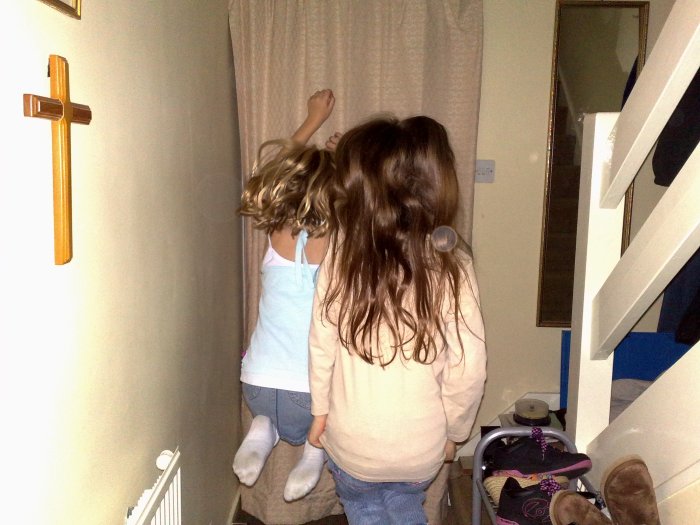
  • why was there no 1:1 comparison on the pic where the girls were jumping? The n82 sure would have garnered more points and a bigger advantage on that aspect.. hehe;)

  • i think in addition to picture quality, the overall performance of each phones (especially with regards to processing speed and cam response) is another factor to consider. (at least some bonus points? haha) Yeah, Steve mentioned that the question was: "Which, taking all (still) photographic attributes into consideration, is currently the best camera-equipped smartphone in the world?", lols

I believe the N82 is still the best camera phone today. What do you think? It does great quality outdoor shots, perfect even for large print-outs, and its Xenon Flash is a very huge advantage, especially in a battle against dedicated digicams.. Samsung i8510 and the N95, both having typical led illumination, won't even stand a chance on night shots, rendering them almost useless at night.

Don't get me wrong, like any other posts by Steve, i really enjoyed that article. I think it really boils down to the user as to how he wants his camera phone to be. And this camera-nitty-gritty series.., sure another helpful guide for those in search of that camera phone they really wanted.. ^^

As for me, the n82 is the real winner! ;-) Thoughts and comments welcome!

Continue Reading...

Tuesday, September 30, 2008

Application Review: Resco Photo Viewer 5.00 - Say Goodbye to your N82's Built-in Gallery


One of the major complaints about the Nokia N82 and any other pre-FP2 devices is the built-in gallery:

  • It has no “folder-to-scan” option. All readable files are cramped in it, including the annoying support images from
    installed applications.

  • It has no sorting nor filtering options

  • Videos and images are combined in it which is absurd.

  • Has the album feature but renders it useless

  • It tends to be slow, especially if you store a lot of media files

Several software updates came and yet this has not been solved. Seems like its better to use a third party gallery application to suit our needs. Very kind of Mike, last week he sent me Resco Photo Viewer for review. I really wanted to get this app long before and here are my thoughts...

Pros:
  • It’s fast.

  • Provides different viewing options

  • Can sort images by name, date, size or format

  • Allows managing of images with folder manipulation

  • Specify favorite folders to be scanned for images

  • Slideshow options are more customizable, and has extra transition
    effects

  • Faster image zooming and panning

  • Handy dandy keypad shortcuts


Cons:
  • No indication of how many images were found.

  • Cannot insert text or clip arts when editing images

  • A not so friendly user interface combined with poor help content

No bangs or whistles on the animation/transition department. I just remembered how the built-in gallery's carousel presentation wow’ed me when I first saw it, and how it wows my friends today. But Resco PV’s functionality really saved its ass. Well, I think it’s unfair to compare it with the s60’s built in gallery when it comes to UI, functionality is what really matters this time, and what we really miss from the s60 gallery.

Here it goes...

Viewing Options

Way better than the s60 gallery.. Resco PV offers several options on how it will display your files. Depending on your preference, you can choose different combinations of three viewing options. Two thumbs up here...
  • All Images or by Folders (folder tree)

  • List or Grid View

  • Small or Large Icons.

Screenshots:

All Images > Grid View > Small Icons


All Images > Grid View > Large Icons


All Images > List View > Small Icons


All Images > List View > Large Icons


Folder Tree > Grid View > Small Icons


Folder Tree > Grid View > Large Icons


Folder Tree > List View > Small Icons


Folder Tree > List View > Large Icons


Set Folders to Scan for Images

Yes! The most prominent feature that the built-in gallery is lacking! Folders-to-scan for images is present in Resco PV. You can limit folders to be scanned for images by setting "Standard" folders (marked with a star icon). When you are in All Images viewing option, only images from the folders you set will be displayed. A very convenient feature indeed!


Zooming and Panning

Almost all of our images are in their full 5 megapixel glory. More often than not, zooming is needed when viewing pictures. And zooming with the built-in gallery is slooow. Panning while in zoom mode? Simply irritating. You’ll need to press the dpad repeatedly just to get a one step panning adjustment..

On Resco PV, zooming and panning is a joy, I tell you! One time quick loading when you try to zoom, after that, everything is instantaneous! Smooth panning and instant zooming up to 1600% (this is overkill i think), nothing more I can ask for. See video below (sorry for the video quality, recorded using a webcam T_T):


Image Editor

There’s also an image editor, and it's better than the built-in gallery’s (or at least for me). It’s faster, and you have more control on color adjustments (rgb). Screenshots below:


Also, you'll have the option to set the jpeg compression when saving an edited image and specify the new image's file name as well. Inserting clip-arts, frames and text is missing, but for me it's not a big problem. Red-eye reduction though is not present. I find it useful sometimes, guess I’ll just open up my gallery if I want to use it (or make sure that I use Red Eye as the flash mode for night shots).

Image Information

This is my favorite, I love how Resco paid attention on presenting image information. I usually do image comparisons and keypad shortcuts for easier access makes the built-in gallery a total loser. Using Resco PV, by simply pressing 5, information about the selected image is displayed. And pressing the left soft key will lead you to the Exif details! Very neat!


Slide Show

There are 11 slide effects to choose from plus the Random transition option. There's Random Image Order also that adds a sort of excitement, when waiting which image might appear next during the show. Same as the built-in gallery, you can also set the duration of each slide and set your favorite mp3 as a background music. The good part is that, with Resco PV, you can create new sets of slide shows from selected images and save it for later viewing. Here's a video (viewing slide shows and adding new sets from selected images). Again, sorry for the quality:


Maybe it's just me, but I like the built-in gallery's slide show presentation than this. On the s60 gallery, zooming and panning during animation really gives more life to the show than that on Resco's. What do you think?

Manage Images

If you want to group your images by folders, no need to open up your favorite file manager. You can directly manage your folders directly on Resco PV. You can create, rename, delete, move folders and transfer your images from one location to another easily when in Folder Tree view. Such a great feature! (hands down)


And More Useful Settings for your Satisfaction

If the built-in gallery has little to no settings, indulge yourself with Resco PV for it presents you with several settings from sorting, image rotation, backlight, slideshow, image rotation and more. You can even set this application to be the default viewer for several image file types.


----------------------------------------------

Overall, I am completely satisfied with Resco Photo Viewer. It does all the s60 gallery can do plus more! I miss the fancy animation and stuff from the built-in gallery, but hey, who needs it more than functionality? I find the user interface quite confusing though, as well as the weak help utility. I believe Resco needs to pay attention to this.

If you are in search for an application to replace your gallery, I highly recommend Resco Photo Viewer. Although it’s not free ($14.95), what’s nice is that you can try it first for 14 days before making a purchase. Click here to download RPV.

Do you already use Resco Photo Viewer? How was your experience with it? Do you think it’s really a good replace for your N82’s built in gallery? Or do you know a different and better application?

Continue Reading...

Friday, September 19, 2008

Speed Up Your N82 Gallery - Separation of Videos and Images Makes For A Better Experience


Hi guys, Aaron here again to share some quick tips for your n82. I know most of you may not find this post very helpful, but if you're like me who stores lots of media files on my phone, this tip is very handy.

The N82 maybe one of the fastest phone to date, but if we have hundreds of pictures and several video files stored on it, the gallery application becomes somewhat sluggish and takes like forever to load. I had this problem before, my gallery takes more than 10-15 seconds before the 'Opening..' dialog box let me access my media files. On a fresh reboot, it would take even longer. And it wont't respond to any key presses until a second or two. This is very irritating, especially when I need to take a look on some picture of notes or documents I need for reference. Also, if my friends want to browse my phone's gallery, I don't want them to wait so long and leave them the impression that my n82 is such a slowbro. In addition, my videos were scattered all over the gallery and there's no way possible to make it filter out videos from images or vice versa.

Based on my personal experience, video files are the major factor that slows down the gallery application. Especially those full length movies that you may have on your phone. If you want to speed up that gallery of yours, you can choose to separate your videos from your images on your N82 (a neat feature that is now implemented by FP2) by hiding them from the gallery. Just set your videos' hidden attributes to true using a third party file manager application like Y-Browser or X-plore. NOTE: Do not rely on setting the parent folder in order to hide several videos. See the Update below. Also, Video Center ONLY displays videos that are located on E:\Videos, and C:\Data\Videos (subfolders are not even scanned). You'll need to move all your videos there so that video center can see them.

Basically, your videos will only be hidden from the gallery, and not from Video Center. So if you want to watch videos, Video Center is the place to go. You can now enjoy browsing pictures on a much faster gallery application. I have 381 images on my phone now and the gallery loads it for as fast as 2-3 seconds (3-5secs on fresh reboot) and presentation is very smooth. Video Center on the other hand don't seem to have any problem dealing with my videos with regards to speed and accessibility. To stay organized, you can create folders to group your videos on Video Center.

----------------------------------------------------------
UPDATE 3: A very good find by one of our regular visitors here, Gareth, is that, moving your videos to the 'My Videos' folder on your memory card will do it all (hiding them from showing up on the gallery, and displaying them on video center). No need to set file or folder attributes anymore! It works like charm on my n82.. If this does not work on yours, then check out Update 2 below.

UPDATE 2: (Might not work on some phones. See Update 3) Another solution is hiding the 'Videos' folder itself. This way, no need to manually hide your videos. Even if you record new videos, they will be automatically hidden from displaying on the gallery. But it will not work by just hiding the 'Videos' folder. We'll need to follow this workaround:

  1. Make sure that your Gallery and Video Center is not open.
  2. Ensure that 'Videos' folder (and any folders inside it) are NOT set as a hidden or system folder.
  3. Using X-plore, rename the 'Videos' folder, any name will do. I suggest simply add a few characters on its name. We'll just need to make the name 'Videos' available for a new folder that we will create.
  4. Open Gallery > Images and Videos to refresh its contents (to update the gallery from the change that was made).
  5. EXIT the Gallery, then back to X-plore, create a new folder on root of drive E:\ and name it Videos (E:\Videos).
  6. Set its hidden and system attributes to true.
  7. Transfer all your videos from the old 'Videos' (the one that you renamed) folder to this new 'Videos' folder. That leaves the old 'Videos' folder empty.
  8. That's it. All your videos are now hidden from the gallery.
  9. If you record new videos, they will not be displayed on the gallery anymore. But if you want them to be available on Video Center, you'll need to move them on E:\Videos. No need to set them as system or hidden files.

I also created a video guide for this. Again, make sure that your Gallery and Video Center is not open before starting:

----------------------------------------------------------


Well thanks to Feature Pack 2 on newer devices, I don't need to rant anymore about what s60 could have done to make the gallery application more useful and logical.

What do you think? Have you had any problems with your gallery or is it just me? Well you can't blame me, I keep hundreds of media files because friends and relatives enjoy watching them on the phone (sometimes on tv).

It'll be great for me to hear your thoughts. Or if you have questions, feel free to leave a comment.


UPDATE 1:

If your gallery displays several copies of one of your videos or several items with broken icons (see screenshots below), DO NOT delete anything. Or you will lose some if not all of your video files. If im not mistaken, this happens if you tried hiding several videos by simply setting their parent folder as a Hidden or System folder. So those several copies are actually different files (or so the gallery thinks but all of them are linked to only one file, that is the video that was duplicated).


To fix this:
  • Undo the hiding process you may have done on your files or folders

  • Make sure that 'Videos' folder (and any folders inside it) on your phone and memory card are NOT set as a hidden or system folder.

  • Exit the gallery to refresh its contents and then open it again to see if your files inside are back to normal.
If you still experience problems or have more questions, don't forget to leave comment ^^.


Continue Reading...

Saturday, August 23, 2008

Review: iGo Stowaway Bluetooth Keyboard & The Nokia N82 - One Of The Best Accessories


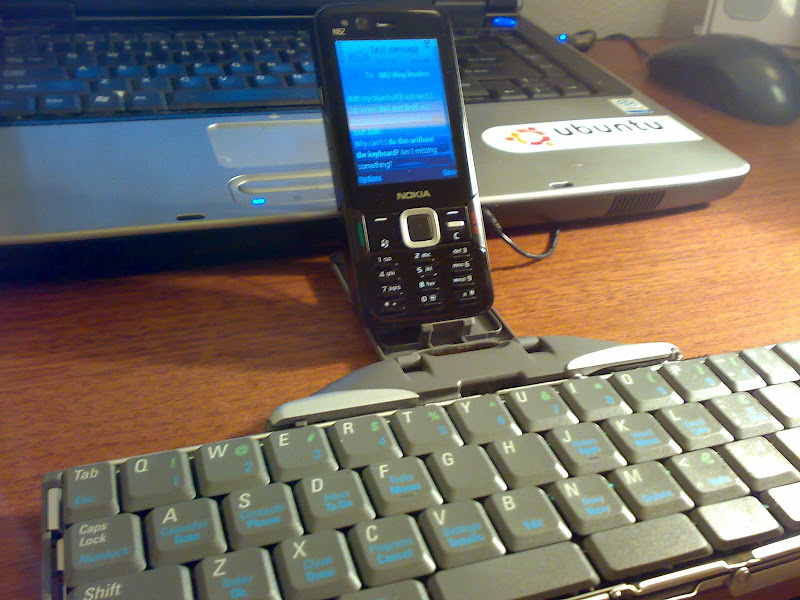
The iGo Stowaway Bluetooth keyboard may look like an ultra geeky toy, especially to those who aren't really interested in mobile phones besides making calls. And it is in a way just a geek toy, but for travelers, bloggers, users on the go & business people this is one of the most useful accessories you can buy for the Nokia N82 - and any supported phone in fact.

I can use the iGo Bluetooth Keyboard for controlling any and every aspect of my Nokia N82. I have yet to find a function that won't work, leaving my hands completely off the N82 and 100% on the bluetooth keyboard. I won't lie to you, there is a learning curve that takes some "getting used to". But once you figure out all the shortcuts - and set your own, there is no reason why you shouldn't be more efficient while using the keyboard.

Shortcut Keys

One of the great things about the iGo keyboard is the amount of shortcut keys that can be applied. There are probably more variations than I need or care to remember. I counted 20 customizable shortcut keys - yes 20! As you can see in the screenshot, the left function key and "d" (LFn+d) will take me to the Messaging application. All of these shortcuts can be changed in the iGo Stowaway application that you must install to get this keyboard working as it should.

Thanks to this post at N95users.com, below are the default shortcuts of the iGo keyboard...
Green FN + backspace = Turn off keyboard for other BT apps to use BT without interference.

All the FN commandos below are the "BLUE FN"

FN + Right Space = Right soft button
FN + Left Space = Left soft button
FN + Enter = Joystick Center button
Shift + Enter = Joystick Center button

HOLD FN + cmd = "ALT + TAB" (Switch between applications)

To select text just hold SHIFT And use arrows to move cursor (just like on a pc, this works with allt arrows except up which is the key for ?)

Shift + FN + Right arrow = Select row until end of row.
Shift + FN + Left arrow = Select row until beginning of row.
Shift + FN + Right arrow = Select next row until.

CTRL + C = Copy
CTRL + V = Paste
CTRL + X = Cut


FN + L = Calculator
FN + : = Web browser
FN + K = Officesuite (on my phone)
FN + J = Notes
FN + F = Task manager
FN + D = Messaging
FN + S = Contacts
FN + A = Calendar
FN + Z = Standby screen (Today screen)
FN + X = application menu (sometimes this doesn´t work, But if I press FN + Z and then FN + X again it works, I dont know why)
FN + C = Standby screen (Today screen)
FN + V = Settings

For swedish users the funny letters ÅÄÖ use these commands:

Alt + E = Ä
Alt + T = Å
Alt + C = Ö

And don't forget the text formatting shortcuts that I showed you the other day...
Today while writing up the review for the iGo Stowaway Bluetooth Keyboard I realized that when I push Control+B on the keyboard it changes the text to bold characters while writing a text message. Typing Control+I makes italic and Control+U makes underline of course. For the life of me I can't figure out how to do it on my N82 without the bluetooth keyboard.

Usability & Build Quality Of The iGo Keyboard


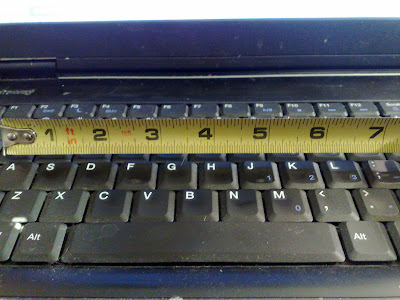
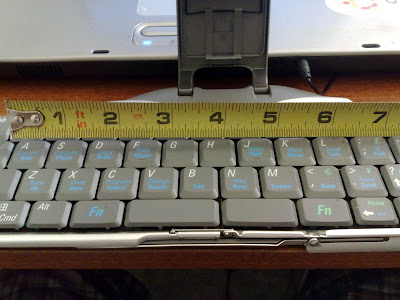
I can't say how relieved I was when I first laid my fingers on the iGo keyboard. I was at first worried that the keyboard would be too small and not comfortable. To be honest with you, the actual keys and spacing is not much different than the laptop computer I use on a daily basis. I measured the distance between the A key - the ; key, where you first lay your hands on the keyboard when you are about to type. As you can see below they are both at about 7 inches. Pretty much no difference at all.


From BT Keyboard


The layout of the keys and the amount of Functions and alternate key shortcuts is what makes it so compact - not the actual size of the keys. For instance the Q key also acts as ! and 1 keys using a blue function key and green function key.

The tactile feedback from the keyboard is also like a real laptop keyboard, and the buttons protrude just enough so you don't make accidental keystrokes. Like I said, once you get accustomed to all the shortcuts this keyboard will be a breeze for you.

Another great surprise is the speed of the keyboard. From the time I press a key to me seeing it on the screen is almost instantaneous. I see no delay while typing or using any functions.

The build quality is great once you get the keyboard opened and closed. The actual keyboard feels solid. I wish the stand where you place the phone is a little stronger and durable, I sometimes feel as if I'm going to break it. Also while opening and closing the keyboard it feels somewhat brittle, you really need to be careful in this process. The keys are durable and strong and so far I've had no problems with keystrokes.

The iGo Bluetooth Keyboard Closed & The Case It Comes With


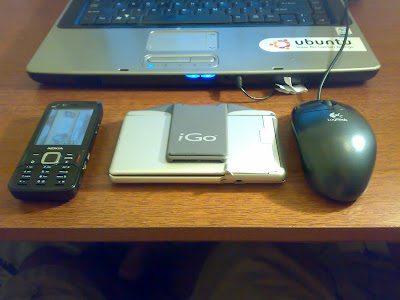
When the keyboard is closed up it's easy to grab and go or slip in a pocket. The measurements are around 5 1/2" inches by 4 1/2 inches, not much bigger than a standard sized photo. The thickness of the iGO keyboard measures at around 1/2 an inch.

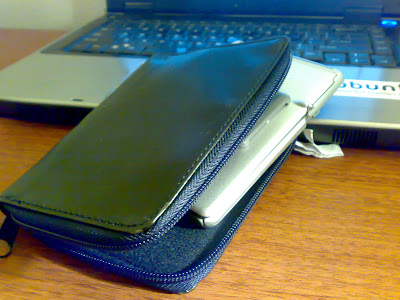
The case that it comes with fits the iGo keyboard perfectly inside, keeping your accessory safe and secure. At first I thought the outside of the case was made of leather, but it's actually not. Regardless it feels strong enough to not get any tears unless you take a knife to it.


The inside of the case is made of a soft fabric to ensure the keyboard won't get scratched or scraped even if dropped. When the keyboard is inside it's case the thickness measures and just around 1 inch. Still not too big considering the functionality you get.

The Amount Of Use I've Gotten Out Of It

Needless to say this keyboard has already my made life so much easier. I've mentioned before I have 2 day jobs and one of them involves lots of down time. This means sitting in my car waiting for further instruction for sometimes hours at a time OFF the clock. I hate bringing my laptop in my car cuz it's just a pain to load it up and pull it out. Now that i have the iGo keyboard I can just bust it out and start responding to the 20-50 emails I get everyday and if I have time start writing drafts for blog articles. If I really wanted to I could have constructed this whole entire article in nearly the same amount of time it took me on my laptop. This accessory has made me 10x more efficient in my everyday life.

A Few Things I Would Change

There aren't many flaws, but like all products there is always something can be improved upon. For instance the power management. The iGo runs on 2 AA batteries. Don't get me wrong I love that I can just swap out the batteries when needed, but I would've also loved this to be a backup to a rechargeable battery using a Nokia charger. Overall I can say I'm impressed with the battery life. I've used this thing for about six to eight hours without having to change the batteries. I'll try and do if a better battery test if any of you request it.

I would have also liked to see an option to use a usb cable instead of only bluetooth. The wire cable would not need to be more than a foot long since your using the phone right next to the keyboard. This would have saved on battery life of both devices. I do love however than I can just close up the keyboard and throw my phone in my pocket without having to fumble with wires.

Better adjustments for the phone stand is another thing I would like to see. The N82 sits perfectly in the stand in portrait mode. But if you want to use the phone in landscape on its side your going to have to play with it a little. I haven't done it yet but I'm going to make some kind of modification to the stand so that my N82 sits perfectly on it's side without slipping.

More Photos of the iGo Stowaway Bluetooth Keyboard With The Nokia N82

Here is a full gallery slideshow of all the pictures I have taken. If you guys need anymore angles let me know. Check out the photos below...

(this flash slideshow may not be viewable in all RSS readers)


If you want to see the bigger sized photos click the icon in the bottom right corner of the slideshow.

The Drivers To Use For The Nokia N82

The driver made by iGo is the best one to use. On their page they don't have one specifically for the Nokia N82, but the N73 version works just fine. Click here to get it. I haven't tried the Nokia application that I've seen floating around my phone and in the Dowload! application. I've heard that you don't get all the shortcuts that comes with the iGo application.


Where To Buy The iGo Stowaway Bluetooth Keyboard

You can pick up this great N82 accessory from Amazon.com for about $70 bucks. Not bad considering how it takes your N82 to a whole new level.


Click here to see the deal.

I know a few of you mentioned you already have this keyboard and love it. Are there anymore tips I can get for using the iGo keyboard with my N82?

Do you have anymore questions about this product? Are any of you interested in picking one up?

Continue Reading...