Showing posts with label N82 Maps. Show all posts

Saturday, July 25, 2009

A Handful Of Google Apps Updated For N82, Including Youtube


If you’re a Google service user you should be happy know that you now have a nearly complete package of tools to make your N82 sync perfectly with your Gmail, Calendar, Contacts, and Maps. There is even a new Google App for the N82 which lets you have another set of Google shortcuts on the homescreen by using the (C) button instead of taking up pressure space. Let’s start with the Google App.

Google App For Mobile

n82-google

If you already use Google applications like Gmail, Maps, Youtube, the Reader website, etc on your N82 then the official Google Mobile App is for you. What is does is creates shortcuts to all the applications you use in one place and also gives you opportunity to search Google and launch your web browser. Use the delete key from the homescreen to open the screen above for quick access to your Google shortcuts and Search.

Google Maps For N82

n82-google-maps

Google Maps for Mobile has been updated in a huge way. They have now implemented something called Layers which lets you add layers of information on top of the maps. This includes traffic alerts & incident reports, points of interest with wikipedia information, and especially cool is your own maps that you’ve added from your PC. Below is an example from Google of how My Maps works for mobile.

photo oppty

Layers on the Map: Latitude locations + My Map

Since my wife and I love participating in cycle touring events on our tandem bike, we thought our challenge for this year -- 1500 KM of riding in Audax UK's Super Randonneur Series -- would make for a great environment to test the Layers functionality while on the go.

The first thing we wanted to try was My Maps. This feature on Google Maps on desktop becomes even more useful with the ability to access them from my phone. We're not alone in wanting this -- it's the fifth most requested feature on the Google Mobile Product Ideas page. It was great to trace bike routes and add places to stop on the computer, add the My Maps layer in Maps for mobile with a few clicks, and see them up on my Nokia S60 handset from our bike.

Seems cool right? I’m personally loving the new version of Google Maps.

Youtube Application For The N82

Screenshot0008

Youtube for the N82 has been updated to run faster and smoother. I showed this application to you awhile back ago, so if you haven’t updated be sure to get it done. It’s a real Youtube application in the native Symbian .sis format, not a watered down web version.

Get The Latest Applications

To get all these updates visit http://m.google.com/maps  for your N82’s browser.

To learn more about this from your pc visit this link.

Continue Reading...

Monday, February 9, 2009

Nokia Maps 3.0 (beta) Updated, Now Works WIth N82


Nokia Beta Labs has just released an updated version of Nokia Maps 3.0 which allows Feature Pack 1 devices like the N82 try out. I won't be installing it on my N82 just yet as I'm currently using the Nokia 5800 full time for review. Probably the biggest updated in Maps 3.0 over the current 2.0 is the ability to lay out your route on the Ovi.com website from your PC before a trip or long day of travels, as pictured above. Funny this comes just after the recent release of Google Maps. The differences between the two applications are obvious. So far Google Maps is doing a better job of search results and quick lookups, while Nokia Maps is better for turn by turn directions and pre-planned trips.

Check out the details from Beta Labs...

Hi all,

Firstly, our Maps team would like to thank those who have provided feedback, bugs, blog entries, suggestions and surveys over the last few months - This has been extremely helpful in enhancing and “fine tuning” the product – so please keep them coming in! :-) We do review all of your suggestions and where possible we look for opportunities to build them into the product.

Now to the exciting stuff….the Nokia Maps Team is pleased to announce an updated release of Maps 3.0Beta. One of the eagerly awaited news is that this updated version now supports S60 3rd Edition Feature Pack 1 devices and N96!

In addition to this, there are also some new features/enhancements to the previous release:

  • Start-up sequence takes you to your current position as soon as position is found. If your position is not found in few seconds, you are taken to last known position
  • You can rotate the map, so you can for example view 3D landmarks from all directions. Just press 4 and 6 in map view. Pressing 5 takes you back to ‘north up’ view
  • In 3D view mode, you can tilt the view by pressing 2 and 8
  • 2D/3D mode works with all map modes, i.e. with Map/Satellite/Terrain
  • My Favourites menu is cleaned up and History list is moved higher in menu
  • My Places has option “Point me to” for any saved place/landmark, you the direction to that place on the map
  • In addition to the synchronisation of Favourites and Collections with Ovi MapsBeta and vice versa (use in online mode, enable Internet connection), you can now plan routings on Ovi MapsBeta and synchronise to your device
  • Finally, many bugs have now been fixed

Maps 3.0Beta works with all Nokia devices based on:
S60 3rd Edition Feature Pack 1 (E71, E66, 6110 Navigator, N95, N95 8GB, N82)
S60 3rd Edition Feature Pack 2 (N96, N85, N79, 6650, 6210 Navigator, 6220 Classic, N78)

Try it out for yourself and let us know feedback!


Check out the video demonstration...


Once again, I won't be trying this out for a few more days. Use at your own risk and remember that it's still in beta, be sure to leave your comments/questions at the Beta Labs blog. Let us know what you think of the application, I'm curious to hear from all of you.

Click here to find the download page.

Continue Reading...

Wednesday, February 4, 2009

Google Maps Updated: Find Your Google Friends On A Map With Latitude


One of my favorite applications on my N82 - Google Maps - has just recieved a huge updated. You can now login to the maps application and see where your other Google buddies are on the map in real time. Great for meetups, parties, or checking on a loved one. This new service is called Google Latitude and brings a welcome competitor to Nokia's beta applications like FriendView and Chat.

Description of Google Latitude:

With Google Latitude, you can:

See where your friends are and what they are up to
Quickly contact them with SMS, IM, or a phone call
Maintain complete control over your privacy
Enjoy Google Latitude on your phone, PC, or both.

Latitude is a new feature of Google Maps for mobile, as well as an iGoogle gadget, that allows you to share your location with your friends and to see their approximate locations, if they choose to share them with you. You can use your Google account to sign in and easily invite friends to Latitude from your existing list of contacts or by entering their email addresses. Google Talk is integrated with Latitude, so you and your friends can update your status messages and profile photos on the go and see what everyone is up to. You can also call, SMS, IM, or email each other within the app.

Check out the video...


So far I'm really digging the "ease of use". If they would enable some sort of Gtalk instant messaging like Contacts on Ovi from Beta Labs has, we'd have some serious issues. Already this is huge because non S60 users can take advantage of this, unliked Friendview or Ovi Contacts which requires other people to have a S60 device.

For privacy issues, you can turn off this feature or preset your location:


Other than the new latitude feature, I haven't really noticed any other changes or enhancements from the previous Google Maps version.

Download: http://www.google.com/latitude

Continue Reading...

Wednesday, December 10, 2008

Google Street View Now Available For S60! Google Maps Updated


A feature I've been waiting for - Google Street View - is finally ready for the Nokia N82 and S60v3 handsets. Browsing through my RSS feeds I just discovered this update thanks to Symbian-Guru.com and this post at Nokia Addict.

You already know about Google Maps right? No need for me to lay it all out? In case you don't you can learn about it here. The new street view will come in handy when navigating to places I've never been before. I recently made a small day trip to areas of Los Angeles that I haven't visited in forever. Having Google Street View on my N82 would have been very handy for me, allowing me to find buildings and addresses much easier, especially since everything is so confined in the city.

A few more screenshots from the new Google Maps update...


Warning: Data will be transmitted. There is no offline feature.


Download from your S60 browser: http://www.google.com/gmm
Or just go to www.google.com and click more products from the N82 browser and you'll find Google Maps.

Continue Reading...

Monday, October 20, 2008

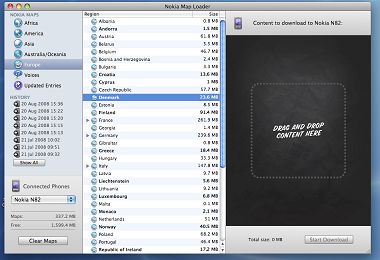
Mac Users: Nokia Maps Loader Now Available


Are you a Mac user? Do you also love your N82? What about Nokia Maps? I've heard alot say they love Nokia Maps and many say it's useless if you have Google Maps. To me Nokia Maps is great because of the turn by turn navigation and the ability to pre-load Maps on your memory card for use without a data connection.

Today Mac users can rejoice. Nokia Beta Labs has released the first version of Nokia Maps Loader for Mac users. Now you can load maps directly to your phone's memory card from your computer instead of over the air.

Steve from the Nokia Map Loader for Mac team had this to say...

We get a lot of feedback through the existing application, Nokia Multimedia Transfer, for all sorts of features and one of the requested items has been a Map Loader for the Mac. So we have worked away to bring out version 1.0. In terms of functionality it is similar to the Map Loader for PC 1.0 but with a definite Mac look and feel. We also wanted to give our Mac users, something extra, so we have added one feature we are hope you will find useful, a history feature.

One thing they ask for is plenty of feedback from the users. As you know this new program is in beta and only you the consumer can help them make it better before the final release.

I personally use the Maps Loader on my PC when going on trips or to cities that I'm not familiar with.

To learn more click here and read about Nokia Map Loader for Macs.

Continue Reading...

Tuesday, October 7, 2008

Wanted: North American S60 Ambassadors - Spread The Word About Nokia Maps


Have you heard of S60 Ambassadors? I've touched on it a few times here at the blog, most recently concerning my new job with the S60 Ambassador Marketing Team. A new campaign has been launched for all North American S60 Ambassadors to spread the word in the real world about Nokia Maps 2.0.

You know that "iPhone" buddy you have? Go show him/her what your Maps program can do that theirs can't. Show them that you can use maps without an outrageous data plan, or any data plan for that matter. Or maybe you have friends/family/coworkers that are new to the smartphone world, or don't understand why you would need GPS & navigation on a phone. Just talk to them about the benefits and then come back to the S60 site and report your stories.

Besides bragging, what are some of the benefits?

"Each Ambassador will get a voucher to try our voice navigation service for 3 months. At the end of the 3 months the 25 most engaged and active Ambassadors will earn rewards. As usual, we'll assign a 2 month loaner phone each week (the E71) to the Ambassador who writes the "Report of the Week."

Not a bad deal right?

To learn more, check out this article.

Anyone can become a S60 Ambassador. Click here to sign up!

Leave a comment below if your already an Ambassador for S60. I'm curious to see how many of you are already on board.

Continue Reading...

Thursday, June 19, 2008

New Nokia Maps Loader 2.0 Beta - Buy Navigation and City Guides From Your PC!


The fellas over at Nokia Beta Labs have a new PC program to help enhance your Nokia Maps experience with your N82. It allows you to purchase navigation and city guides directly from your PC. You can preview different navigation methods such as Driving, Walking, etc. before you make a purchase.

screenshots


From Beta Labs,
Selecting “Guides” will let you browse through City Guides and Multimedia Guides from all over the world. Selecting one will show you information on the contents and you can download them directly to your device. It has never been so easy to find the right guide for your destination!


Also new in this program is the ability to connect several devices...

Nokia says,
New connection mode
Map Loader 2.0 now supports PC Suite connections. This means that you can connect several devices over USB or Bluetooth connection. Mass storage mode is also supported for older Nokia Maps versions and memory cards. In mass storage mode the new “Services” tab will not be available and Map Loader 2.0 will behave like Map Loader 1.x. On startup, a popup will show connected devices and will let you choose the drive/device to use. Make sure you have the latest PC Suite installed (http://www.nokia.com/pcsuite).


Keep in mind this new program is still in beta and may have bugs. Nokia is so kind to put this out their for us to try before it's ready so we can give them our personal feedback. If you try this out and have problems or suggestions be sure to leave them comments on their blog.

For more information, check out Nokia Beta Labs.

Continue Reading...

Wednesday, June 4, 2008

Google Maps Updated! Now Add Favorites & It's Much Smoother


Hey guys and gals. Just letting you know that Google Maps has been updated and a great new feature has been added. You can now add favorites just like Nokia Maps and even import places that you have saved in Nokia Maps. I wrote about this the other day over at Symbian Addict, but the version had a bug. Today the bug has been fixed and its now safe to download and use. I highly recommend this upgrade. If you want to read more about the newest version of Google Maps for the Nokia N82 click here to check out my article.

Download: www.google.com/gmm

If you've never tried out Google Maps, you might want to check out this article.

Continue Reading...

Monday, May 26, 2008

Nokia Maps 2.0 Final Version Available Now


In case you didn't hear Nokia made Nokia Maps 2.0 available for the masses. Before anybody was free to try out the beta version which was for testing purposes.

Downloaded over 240,000 times since announced in February, Nokia Maps 2.0 has improved its optional Car Navigation, enhanced its pedestrian navigation, added multimedia city guides, now offers satellite images, and is sporting a redesigned user interface. Nokia's mapping and navigation solutions give people navigation features, local content and world maps directly on their mobile device, in a way that only connected devices can.

A partial list of the updated features in Nokia Maps 2.0 includes:

DRIVE:
- Improved optional Car Navigation equals PND-level car navigation experience with faster routing.
- Easy-to-use, updated User Interface features including a new navigation carousel with pre-defined navigation views - i.e. navigation, arrow, bird-eye.
- Top-of-the-line navigation features: signposts, multi-stop route planner

WALK:
- Optional pedestrian navigation efficiently walks you from A to B with visual guidance. It helps you to locate yourself by giving information about the surrounding buildings, streets and parks and, if the device supports it, notifies the direction you are walking.
- Nokia Maps 2.0 includes public transportation information (station entrances) data in 17 cities with localized icons for stops.
- Advanced multi-sensor positioning using A-GPS, and pedestrian orientation using the compass feature (Nokia 6210 Navigator needed for built-in compass usage)

DISCOVER:
- Satellite images with hybrid rendering overlays for selected cities worldwide provide real aerial views on your mobile.
- Signature "one-box search" allows you to search through places, addresses, restaurants, nightlife, outdoor, accommodation.
- New premium multi-media city guides including features photos, video, audio streams.

Nokia Maps 2.0 uses vector maps provided by Navteq and TeleAtlas, Nokia Maps now has maps covering over 200 countries, with over 70 of them navigable. Maps can be downloaded over the air directly to selected devices or by using the Nokia Map Loader on a PC. A new beta version of the Nokia Map Loader is available on the Nokia Beta labs web site.

Like I mentioned over at Symbian Addict the other day I am more a fan of Google Maps, but I can understand why people would like Nokia Maps better. The turn by turn directions are much better along with the option for voice navigation, which is subscription based. Plus you can preload Nokia Maps onto your memory card and use the application anytime without having to use data. Great for those without a good data plan.

When you install this new version you don't need to delete the old one, it will just be overwritten. You might run into problems trying first delete the old version. Just allow the installer to replace the old version.

Also for people that have a free voice nav trial with their new N82, the license will be automatically carried over so you don't have to worry about losing it.

Which do you prefer? Nokia Maps or Google Maps. Personally I think it's good to have both installed on the phone. Both are good for various situations.

Visit http://www.maps.nokia.com/ to download the new Nokia Maps 2.0, and check out the Maps Loader while your at it.

Continue Reading...

Thursday, May 8, 2008

Nokia Maps 2.0 beta Updated, Almost Final


For those who use Nokia Maps alot the 2.0 beta version has been updated to fix bugs and apparently a few new features have been added. I personally never use Nokia Maps so I don't know much about this release. I'm a huge fan of Google Maps instead. More details should come soon. Keep in mind its still in testing mode but is stable. According to the developers it's almost ready for the final version.

If your interested click here to download the latest version and be sure to report any bugs you may find so they can work them out before the final release.

Overview
Nokia Maps is taking maps and navigation experiences to the next level and introducing Walk - pedestrian navigation, in addition to Drive - world class car navigation, multimedia city guides, satellite maps and other innovative features. With free maps of more than 150 countries, over 15 million points-of-interest, the world is in your pocket. Don't get lost or choose to get lost in the right places to explore, and let Nokia Maps show you the way.

Nokia Maps 2.0 Beta comes with compatible Nokia Map Loader, also available for download from this site. With Nokia Map Loader you can get the newest map data, which is required by some Nokia Maps 2.0 features such as Walk navigation.

Continue Reading...

Sunday, March 30, 2008

Photo Sharing: Point Ferman Lighthouse, Sunken City, & The Korean Bell In San Pedro, CA With The N82


Today my sister, girlfriend and myself headed out to San Pedro, CA. to visit Point Ferman Park where you can find a lighthouse and something even cooler called Sunken City right below the park. San Pedro is located on California's coast. We also visited the Korean Bell of Friendship that was given to America as a gift from South Korea over 30 years ago.

As we all know "Storytelling Rediscovered" is the catch phrase that Nokia uses to promote NOkia N82. In this post I'll share the story of my day by showing off the photos I took. Ever since I got the N82 I find myself taking a lot more pictures than I ever have and then sharing them later with friends and family. Storytelling with photos has been discovered for me.

The map below has a handful of the photos I took laid out in the exact GPS location they were shot. Using Location Tagger the N82 automatically tags all my photos with the GPS location. Location Tagger is a free application still in beta that you can try out on your phone. With the next firmware update and the release of the black N82 this will be built into the phone.

navigate and zoom using the controls on the top left to see more pictures


View Larger Map


Using the new Share Online 3.o the photos are tagged and uploaded to Flickr with one touch upload where I can then grab the feed and embed the photos into the Google map that you see below. I can go in and add titles and descriptions to each photo to explain the story of the photo. The map is live so if I go back there tomorrow and take some more shots I can upload them to Flickr and tag them accordingly. The pictures will show up on the map automatically so I can share them with friends and family. I find this great for recording trips and vacations to go back a look at them later.

Technology that the Nokia N82 brings changes the way we view our media. My parents keep photo albums that they pull out of a closet to show off when people visit. Of course this will never go away. But now we have more options. I don't keep a physical photo album myself. Instead I'll pull up a map on the internet just like the one above and show off all the pictures that way. For long distant friends or relatives I can email the map to them instead of waiting years to see them and show off my stories.

I was going to write up a tutorial to show you guys exactly how to do this but remembered that Mark Guim from The Nokia Blog wrote a good article a while back ago. Click here to learn how to embed your N82 photos on a map then onto your website, myspace, email, etc.


In the slideshow are photos from the Sunken City, Point Ferman Lighthouse, and the Korean Friendship Bell. Sunken City is a chunk of a park and road that simply fell apart and into the ocean. The land is on a cliff overlooking the ocean and just gave way over 50 years ago. I don't really know much history behind it but it was an amazing experience walking around all the rumble that is still there. Of course its all been vandalized as you can see. Some of the photos of the bunker with the locked door is a place where the US military had cannons that they could shoot into the water since Japanese subs were thought to be creeping up on the West Coast. Not sure if they ever did get that close, but it's nice to know thatour forces were there to protect us during World War II. The bunker now just sits there for everyone to check out.

Making this slideshow was easy using Ovi, Nokia's new online photo sharing service which is also integrated with Share Online 3.0. There are also ways to do this with Flickr but I prefer Ovi because of the simplicity. To make the slideshow you just go to the Ovi Channel you want to share and off to the right click the link "embed this channel". You are then taken to a page that looks like this where you can grab the code provided and embed it into your website, myspace, etc. I couldn't use Ovi for the maps because they don't currently support geofeeds like Flickr does. I've contacted Ovi about this and they said they are working on it and it will be available in the future. Hopefully that means soon so I can do away with Flickr and their $25 a year once and for all.

If you have any photos of places or events that you would like to share here at the blog via a slideshow in Ovi don't hesitate to contact me so that I can make a feature article.

Continue Reading...

Friday, March 14, 2008

Stavros: The Greatest Art Ever Made With The Nokia N82


Well the flamboyant and lively Stavros, the king of "position art", has made his greatest masterpiece. Using his Nokia N82 to track his steps via GPS, video, & photo, Stavros wandered around Rome creating a path that is layed out on a map which can be viewed at his blog.

Click here to head over and check out his art.

Continue Reading...

Thursday, March 6, 2008

Google Maps For The N82 - Alternative To Nokia Maps


I'm sure many of you already know about Google Maps for S60, an alternative to Nokia Maps. I prefer Google Maps bigtime over Nokia Maps, but I guess it's personal preference.

If you haven't tried Google Maps then maybe you should give it a try. Make sure you have a data plan cuz this application uses all data, which I actually prefer. Nothing is taking up space on your memory card like Nokia Maps.

Google Maps uses GPS and your phones signal to get your location. Upon starting the application your location is found almost instaneously. Once found you have some great options. If your on the freeway, you can check the traffic by pressing 7. You'll see either red, yellow, or green. I'm sure you know what the colors stand for. Zooming in and out is a breeze by pressing the 1 and 3 key. You can scroll around the maps and then push 0 to get back to your current location.

The search feature is where I think Google Maps really excels over Nokia Maps. Since your using the most powerful search engine in the world, your going to get great results. Typing "gas station" gets you all the stations nearest to your location. Pick the one you and you you have tons of options. You can call directly from the application, go to website, get directions to and from the selection, and below that you are presented with the rest of the search results. You also have the option to "save to contacts" which is a huge plus for certain buszinesses or contacts that your always in touch with.

A few other features are also worth noting. Sometimes, for some reason, your in a building and your not getting a GPS lock. Google Maps can also find your location buy using your phones signal. It's an approximated location, usually within about 1200 meters. Still handy if your sitting at the DMV and decide your gonna try and find a place to eat. You don't need your exact location, but the general location would be perfect. Satellite views are also available. Of course sometimes I get some oddball results from Google, but overall I get what I'm looking for.

As for directions, you get step by step instructions. You go to the next step by pressing 6 and back by pressing 4. It doesn't update turn by turn. There is no option for voice guidance, but hopefully Google implements these features in the future.

To download Google Maps, go to http://www.google.com/ on your N82 and scroll down to where it says Gmail, Maps, & more. Click the Maps(download) link.

Will you be trying out Google Maps for the N82? If you already have it, whats your opinion vs. Nokia Maps?

Continue Reading...

Monday, February 11, 2008

Nokia Maps 2.0 Beta Available For Nokia N82


Nokia just announced the future of the Maps application at the Mobile World Congress event. And with this announcement you can now download the new Nokia Maps 2.0. But be careful it's still in beta, however reports are coming in that it's stable. One of the biggest features announced is real time traffic conditions. Right now it's only supported in European countries, but we should be getting some USA love soon. Maybe this will replace the necessity for the Google Maps application.

Here is a rundown of the new features in Nokia Maps 2.0 -

Nokia Maps 2.0 adds Walk, a pedestrian focused navigation component to the application, while still offering Drive, a world class car navigation system. The pedestrian navigation efficiently walks you from A to B with visual turn-by-turn guidance. It helps you to locate yourself by giving information about the surrounding buildings, streets and parks (including pathways through the park).

The new Nokia Maps 2.0 update also adds the option to purchase first-class multimedia guides that feature photos, videos and audio streams to enlighten your journey even more. As with the previous version of Nokia Maps, map users will receive a free 3-day Navigation trial, for Walk and Drive, plus an additional free 10 minute City Guide trial.
"By taking navigation services out of the car and onto the sidewalk, Nokia is enabling people to explore and discover what's around them with the confidence of a local," said Michael Halbherr, vice president, Nokia location based services.

Upgrading to the GPS navigation option enables your mobile to become a powerful connected personal navigation device, that provides clear, turn-by-turn visual and voice guidance. If your Nokia device doesn't have built-in GPS, you can also use an external GPS module with a compatible device. Nokia Maps 2.0 will also have, for an optional fee, real-time traffic feeds with dynamic re-routing in 18 European countries. With vector maps provided by TeleAtlas and Navteq, Nokia Maps now has maps covering over 200 countries, with over 70 of them navigable.

Nokia Maps 2.0 can also lead you to the nearest transit station using localized icons in 17 cities so you can hop on the Metro to get across town. While you are on riding on the Metro you can discover and explore new places using the hybrid satellite views or by purchasing one of the new multimedia city guides from companies like Berlitz. The expert advice on where to go and what to do, combined with the integrated Nokia mobile search, helps Nokia fulfill its goal of bringing people context aware Internet services forward.

For some awesome photos and a good review, check out this post by The Symbian-Guru. Ricky was one of the first to get his hands on this application.

Click here to download Nokia Maps 2.0 for the Nokia N82.

Continue Reading...