

Are you looking for a screen protector for the N82? Or maybe full body protection? We've had our devices for awhile - and one thing I've learned is the longer you have something the less you take care of it. Whenever my sim card is in the N82 I tend to abuse it and don't treat it as gently as my Nokia N97. I've never protected my N82 in the past but I'm starting to think it might be time to find some good protection for it. Especially since I think I'll be hanging onto it for awhile as Nokia hasn't mentioned anything about a new Nseries device with Xenon flash. Keep reading for a few solutions that I recommend to keep your N82 in top notch condition.
invisibleShield by Zagg
First and foremost I always recommend the invisibleShield by Zagg for all my devices. I use invisible shield for my N97 and Acer Aspire One netbook. They are a royal pain to put on but once you get it right - it's barely noticeable and does an excellent job protecting every inch.
Check out the video below that I found on Youtube:
Of course if you don't want the full body protection they also sell just the screen protector for the N82 which comes with a lifetime warranty.
Visit Zagg.com
Nokia N82 (Full Body)
Nokia N82 (Screen)
Proport Screen Protector
Another product I recommend is the N82 screen protector by Proporta. This company always makes great products, and I've heard nothing but good things about their screen protectors.
Proporta Advanced Screen Protector (Nokia N82 Series)
More Screen Protectors
If you want to see more options check out Amazon and their listing of screen protectors for the N82
Do you protect your N82? If so, what brands do you use?
Wednesday, September 9, 2009
N82 Screen Protector - Are They Needed & Which To Use?


Wednesday, May 27, 2009
The Zeemote JS1 Controller and The Mighty Nokia N82
 Hi guys, my name is Alexis Garza, also known as alexismil. I'm from Reynosa México and I will be writing for The N82 Blog from now on. I'm a Symbian fanatic, and I'm here to introduce the Zeemote JS1 to you.
The Zeemote JS1 is a small bluetooth device that uses 2 AAA batteries, and that support the wide variety of nokia models, including the Nseries, Eseries, XpressMusic, Navigator and Classic series, of course, S60 devices (excluding the nokia 5800 XpressMusic and probably the N97 that are not supported at the time im writing this article). All you have to do is download the Zeekey application and you are ready to go. The Zeekey application works on plenty S60 device, as mentioned before.

The Zeemote JS1 is good for gaming, but not great. I have found that it doesn't play nice in all games, including N-Gage games. You have to create several profiles into the Zeekey application in order to play every game out there. For example, I have a "default mapping" for using it to move around the interface when connected to a tv using the tv-out cable and I have another key mappings for N-Gage games. In the game One, Bounce, Metal Gear Solid I use the default joystick configurations, but changed the A Button to 0 key and B Button to 5 key, C Button to Right Soft Key and D Button to Left Soft Key. But because the joystick is so sensitive, I have a different configuration for Asphalt 3 and 4. If I use the default joystick I end up pressing down when using a nitro so I disabled the joystick down to "No Action". In Star Wars: The Force Unleashed I have the default joystick settings but i did swap the A and B buttons to 5 key and 0 key respectively.

I have come to a conclusion that the Zeemote JS1 is good but not great. I have seen plenty of interviews when they say that it is great for playing games using the tv-out feature. So why use a joystick then and a "one hand" shape? If so, they should have gone for the SNES style controller - a standard pad, no joystick, a, b, c, and d keys, and shoulder buttons. The shoulder buttons make sense when using the soft keys, this way you shouldn't have a big selection of key mappings like i do. I have 6 key mappings and i haven't even created a key map for all my N-Gage, java, and Symbian games.
I know all S60 devices have d-pads, and most of the time they are not good when playing games, but they have very good tactile feedback and performance. The Zeemote JS1 has a very sensitive joystick (they should have taken a comfortable pad instead of a joystick) so most of the time you end up doing something you did not want and end up losing a One battle, losing an Asphalt 3 or 4 race, or even dying on Platypus / Sky Force Reloaded.

I hope you like my review of the Zeemote JS1 , feel free to ask any questions related to the JS1 controller.
Monday, February 9, 2009
My San Francisco Trip Photos, Experience, & I Got Engaged!
Some of you might remember I made a post last Thursday while boarding the plane before leaving to San Francisco. The trip was from Thursday through late Saturday and was absolutely amazing. Between seeing the up and coming U.K. singer Adele in concert, checking out the sea lions at Fisherman's Wharf, walking halfway across the Golden Gate bridge, running from bums yelling vicious things at us, etc etc - I proposed to my wonderful girlfriend. And she of course said YES! It was truly a great moment for the both of us, she was completely shocked. I've been meaning to do this for a long time, and I figured this trip would be perfect since she loves the city of San Francisco. Seems as though there is quite a trend going on here with Nokia bloggers getting married. It all started with Ricky, then Mark Guim, then Ravindra, and now myself. And I feel like I left someone out in between, maybe not. Thankfully, I had my N82 with me to capture a ton of amazing pictures during this special trip...
I don't even know where to start with the rest of this article. Here we go...
First off, I'll give you a few details of the trip. We arrived on Thursday around 1pm, got off the plane, and took the Bart (public transportation) all the way to our hotel, literally the foot of the hotel. We stayed at the Hotel Whitcomb on Market Street. Highly recommended for those looking for something decent with a good price. The public transit system in San Francisco is nothing short of perfect. For $11 per day you can get unlimited rides on the bus, cable cars, and street cars. These will get you almost anywhere you want to go in the 12 mile radius city - 24 hours a day. Not to mention the taxis really don't charge much either if you don't feel like waiting. Surprisingly we didn't eat at a lot of places, mainly because each meal was so filling so we only ate twice a day, with random snacks in between. Off the top of my head we went to Bubba Gump Shrimp, Floating Boat Sushi, Noah's Bagels, Market Street Restaurant, some India food place connected to a Kennedy's dive bar, Escape From New York Pizza, and I can't even remember the rest. We also got to see Adele in concert, and she was absolutely amazing. A very talented singer that will be well respected for years to come. She actually won a grammy last night for Best New Artist. The venue was called Warfield Theatre, which had amazing art on the ceilings, great sound, and a perfect view of the band and singer. The overall vibe of the concert was that she didn't expect such a supportive and exited crowd, she was overwhelmed. All the fans were happy to share the experience with her. Walking the Golden Gate was amazing, Haite-Ashbury streets where the hippies hangout was cool, and of course Fisherman's Wharf had some much to see and eat.
Enough about the trip - what about the tools?
Devices:
Obviously I decided to take my N82 with me. I almost opted to leave it at home and go with the E71 (larger battery) and bring a digital camera. Before I left my house I just couldn't part ways with the N82 - what if I wanted to snap some really quick pics without digging in the camera pouch? Plus, I just feel more comfortable with my trusty N82. I did however still bring along the Olympus 8mp camera, and yes it served me well. I think all in all I took an equal amount of pics with both cameras, and surprisingly the N82 had much better results in some instances especially the video recording.
Power:
I got the Proporta Mobile Travel Charger said about a month ago, and wanted to get some really good use out of it before I gave you guys the full review, which is soon to come. Let me tell you - it's a MUST-HAVE accessory for any trip. Between all the photos, video, geotagging, navigation/travel guide/maps, and keeping my work email on (just in case), the Proporta really saved my ass. If I didn't have that handy little battery charger I would have probably left the N82 at home and brought the E71 just for it's ginormous battery.
Sofware:
Google Maps was a life saver. It has the whole San Francisco public transit system laid out beautifully, and even gave me departure times and schedules. I used Nokia Maps and it's guides to get a few reviews of different places, and on a few occasions some turn by turn walking directions. All my "places of interest" that I wanted to visit were previously saved as Favorites before I left for the trip. This came in handy BIGTIME. I wanted to get some use out of Sports Tracker and Vine, but it completely slipped my mind. I'm kind of glad I didn't fiddle with those apps because they would have got in the way of the amazing time we were having. Maybe next time because it would be interesting to see our path and photos all laid out on a map.
Photos:
All of the pictures below were taken with my N82 and uploaded to Ovi. Check out the flash slideshow (not viewable in RSS readers)...
Video of Adele live in concert @ The Warfield Theatre
The quality of the video and the sound came out great. I was especially let down by the sound recordings of live music in the past, but this has left me very surprised. Maybe this was fixed in a recent firmware update? The first video has about a 1 minute intro before she begins to sing. Bear with the shaky camera at the start. Check it out...
If you liked it, here's another song.
Overall it was a great trip and we're extremely happy engaged. The wedding won't be for about a year from now so don't be waiting anxiously for another "Nokia blogger" wedding..
Needless to say San Francisco is a great city and left a good impression on my first time being there.
Not to mention every place had great local beer. Cheers!


Thursday, January 22, 2009
Protection: Tinted Crystal Cover For The N82
I invited my pal Ravindra to write a guest story about his new crystal case he uses to protect his new Nokia N82, and he gladly obliged. You can find more of his writings over at Symbian Stories. Check out his article below...
I'm a good care taker for my phones always,I still have my N95 8GB looking as it is just taken out of the box.On the 1st of January I thought of buying an N82 (Here are the reasons for my choice) and one problem I face since the day i got it in my hand is that the phone doesn't stay grabbed on to my hand, it always tend to slip down.It may be due the glossy surface but I never wanted it to slip from by hand. So I was thinking of a proper protection for my N82, and started to surf through the mobile accessory shops in my area, but couldn't find something that suits me.
But yesterday when I went to buy a crystal cover for my N95 8GB, I accidentally hit my eyes on a crystal cover for the N82, it was a tinted one so I wasn't very comfortable with it, because I thought that a tinted cover over the screen will ruin the display. But at last I bought it,as there wasn't a choice and after coming home I was in a hurry to try it on. Unbelievably this little piece of tinted plastic looks so great when it is on the device and the tint doesn't have any effect when the display is lit up. Also as you can see in the photos below, the tint completely changes the look of the N82, I was worried of having to buy a silver one but now my N82 looks more like a black one, and bit more special too. Also the crystal cover does have little pieces of plastics to covers the keys making them more easy for me to type, especially this is great if you have big finger tips. Most of all now it grabs well in my hand and not susceptible to unexpected loosing of grip anymore.


Now I'm totally satisfied with the protection precautions on my trusty N82 and I would love to know what kind of protection you use on yours?
Sunday, January 11, 2009
Your N82 on a Nokia DT-29: Camera and Video Delight

Last Christmas, when my brother came from Manila, he had a Nokia DT-29 tied up with his S40 phone. If you have not heard about it yet, it's an accessory that comes with the Nokia 5800 XpressMusic, which serves a simple yet a very useful purpose: a stand that lets the phone stand by itself mainly for watching videos. My brother had his hands with his friend's 5800 Tube, and borrowed the DT-29, just to tease me. He said at least I'd be able to experience "the accessory" if not the phone itself. Poor me T_T.
After using it, I really enjoyed this accessory. It's like taking out the N96's kickstand so that (almost) every mobile device can make use of it. It saves me from having to hold my N82 all through out the period of a full-length movie. It can also be adjusted to fit different viewing preferences. Here are some pictures:
You can choose to widen up the distance between the two handles or narrow them down to adjust the inclination of your device:
You can also use it as a "sort of" a tripod for taking self-timer pictures. As well as video footage of yourselves, great for video bloggers. They can just place it on a desk, set a desired angle, press record, and voila! You and your free hands on the video. You will also be able to get better quality as the phone will be much steadier than when held by your hands:
It fits well with the N82, and with the N95 8gb as well:
It would be great if Nokia would put the DT-29 as a standard in-box accessory on all upcoming N-series devices. Or as Devin stated on his blog:
maybe Nokia should sell this one separately as it looks like it could come in handy with every Nseries
and the question: Would you buy one?
UPDATE:
Learn how to create your own improvised version of the DT-29, from Steve of All About Symbian.


Saturday, August 23, 2008
Review: iGo Stowaway Bluetooth Keyboard & The Nokia N82 - One Of The Best Accessories
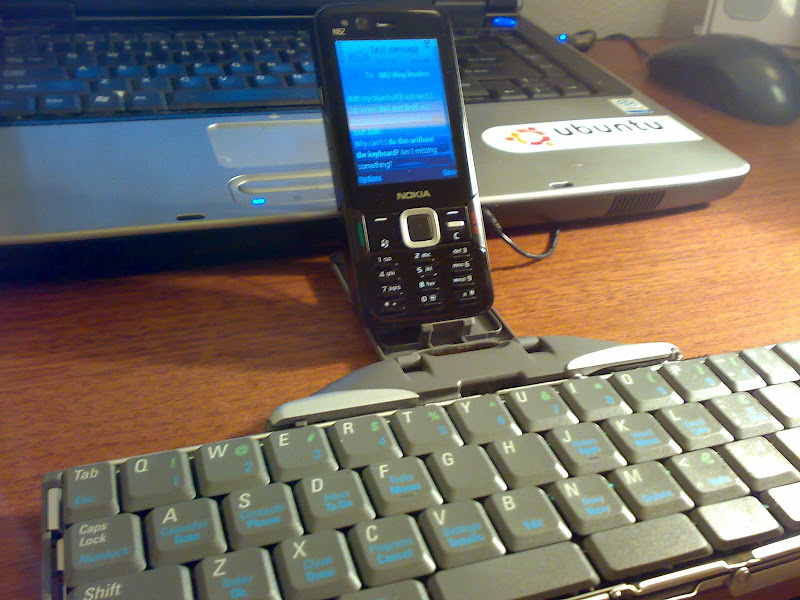
The iGo Stowaway Bluetooth keyboard may look like an ultra geeky toy, especially to those who aren't really interested in mobile phones besides making calls. And it is in a way just a geek toy, but for travelers, bloggers, users on the go & business people this is one of the most useful accessories you can buy for the Nokia N82 - and any supported phone in fact.
I can use the iGo Bluetooth Keyboard for controlling any and every aspect of my Nokia N82. I have yet to find a function that won't work, leaving my hands completely off the N82 and 100% on the bluetooth keyboard. I won't lie to you, there is a learning curve that takes some "getting used to". But once you figure out all the shortcuts - and set your own, there is no reason why you shouldn't be more efficient while using the keyboard.
Shortcut Keys
One of the great things about the iGo keyboard is the amount of shortcut keys that can be applied. There are probably more variations than I need or care to remember. I counted 20 customizable shortcut keys - yes 20! As you can see in the screenshot, the left function key and "d" (LFn+d) will take me to the Messaging application. All of these shortcuts can be changed in the iGo Stowaway application that you must install to get this keyboard working as it should.
Thanks to this post at N95users.com, below are the default shortcuts of the iGo keyboard...
Green FN + backspace = Turn off keyboard for other BT apps to use BT without interference.
All the FN commandos below are the "BLUE FN"
FN + Right Space = Right soft button
FN + Left Space = Left soft button
FN + Enter = Joystick Center button
Shift + Enter = Joystick Center button
HOLD FN + cmd = "ALT + TAB" (Switch between applications)
To select text just hold SHIFT And use arrows to move cursor (just like on a pc, this works with allt arrows except up which is the key for ?)
Shift + FN + Right arrow = Select row until end of row.
Shift + FN + Left arrow = Select row until beginning of row.
Shift + FN + Right arrow = Select next row until.
CTRL + C = Copy
CTRL + V = Paste
CTRL + X = Cut
FN + L = Calculator
FN + : = Web browser
FN + K = Officesuite (on my phone)
FN + J = Notes
FN + F = Task manager
FN + D = Messaging
FN + S = Contacts
FN + A = Calendar
FN + Z = Standby screen (Today screen)
FN + X = application menu (sometimes this doesn´t work, But if I press FN + Z and then FN + X again it works, I dont know why)
FN + C = Standby screen (Today screen)
FN + V = Settings
For swedish users the funny letters ÅÄÖ use these commands:
Alt + E = Ä
Alt + T = Å
Alt + C = Ö
And don't forget the text formatting shortcuts that I showed you the other day...
Today while writing up the review for the iGo Stowaway Bluetooth Keyboard I realized that when I push Control+B on the keyboard it changes the text to bold characters while writing a text message. Typing Control+I makes italic and Control+U makes underline of course. For the life of me I can't figure out how to do it on my N82 without the bluetooth keyboard.
Usability & Build Quality Of The iGo Keyboard
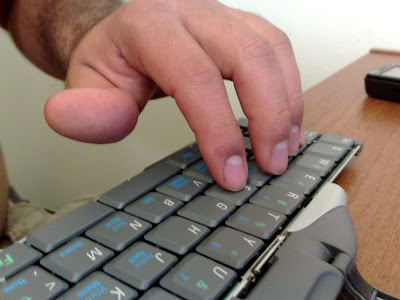
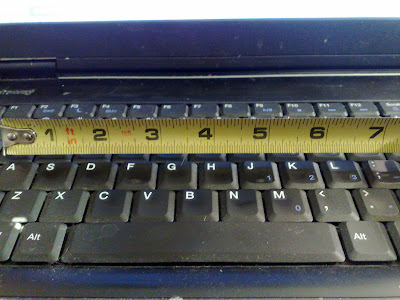
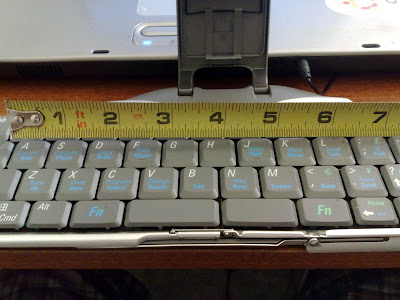
I can't say how relieved I was when I first laid my fingers on the iGo keyboard. I was at first worried that the keyboard would be too small and not comfortable. To be honest with you, the actual keys and spacing is not much different than the laptop computer I use on a daily basis. I measured the distance between the A key - the ; key, where you first lay your hands on the keyboard when you are about to type. As you can see below they are both at about 7 inches. Pretty much no difference at all.
 |
| From BT Keyboard |
The layout of the keys and the amount of Functions and alternate key shortcuts is what makes it so compact - not the actual size of the keys. For instance the Q key also acts as ! and 1 keys using a blue function key and green function key.
The tactile feedback from the keyboard is also like a real laptop keyboard, and the buttons protrude just enough so you don't make accidental keystrokes. Like I said, once you get accustomed to all the shortcuts this keyboard will be a breeze for you.
Another great surprise is the speed of the keyboard. From the time I press a key to me seeing it on the screen is almost instantaneous. I see no delay while typing or using any functions.
The build quality is great once you get the keyboard opened and closed. The actual keyboard feels solid. I wish the stand where you place the phone is a little stronger and durable, I sometimes feel as if I'm going to break it. Also while opening and closing the keyboard it feels somewhat brittle, you really need to be careful in this process. The keys are durable and strong and so far I've had no problems with keystrokes.
The iGo Bluetooth Keyboard Closed & The Case It Comes With
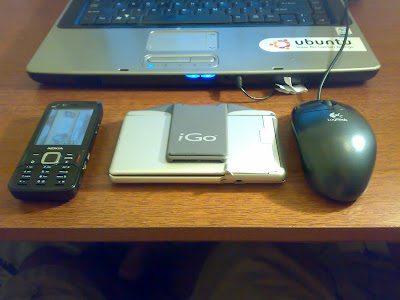
When the keyboard is closed up it's easy to grab and go or slip in a pocket. The measurements are around 5 1/2" inches by 4 1/2 inches, not much bigger than a standard sized photo. The thickness of the iGO keyboard measures at around 1/2 an inch.
The case that it comes with fits the iGo keyboard perfectly inside, keeping your accessory safe and secure. At first I thought the outside of the case was made of leather, but it's actually not. Regardless it feels strong enough to not get any tears unless you take a knife to it.
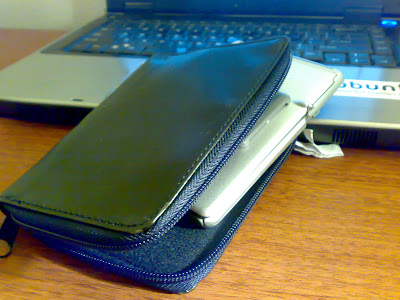
The inside of the case is made of a soft fabric to ensure the keyboard won't get scratched or scraped even if dropped. When the keyboard is inside it's case the thickness measures and just around 1 inch. Still not too big considering the functionality you get.
The Amount Of Use I've Gotten Out Of It
Needless to say this keyboard has already my made life so much easier. I've mentioned before I have 2 day jobs and one of them involves lots of down time. This means sitting in my car waiting for further instruction for sometimes hours at a time OFF the clock. I hate bringing my laptop in my car cuz it's just a pain to load it up and pull it out. Now that i have the iGo keyboard I can just bust it out and start responding to the 20-50 emails I get everyday and if I have time start writing drafts for blog articles. If I really wanted to I could have constructed this whole entire article in nearly the same amount of time it took me on my laptop. This accessory has made me 10x more efficient in my everyday life.
A Few Things I Would Change
There aren't many flaws, but like all products there is always something can be improved upon. For instance the power management. The iGo runs on 2 AA batteries. Don't get me wrong I love that I can just swap out the batteries when needed, but I would've also loved this to be a backup to a rechargeable battery using a Nokia charger. Overall I can say I'm impressed with the battery life. I've used this thing for about six to eight hours without having to change the batteries. I'll try and do if a better battery test if any of you request it.
I would have also liked to see an option to use a usb cable instead of only bluetooth. The wire cable would not need to be more than a foot long since your using the phone right next to the keyboard. This would have saved on battery life of both devices. I do love however than I can just close up the keyboard and throw my phone in my pocket without having to fumble with wires.
Better adjustments for the phone stand is another thing I would like to see. The N82 sits perfectly in the stand in portrait mode. But if you want to use the phone in landscape on its side your going to have to play with it a little. I haven't done it yet but I'm going to make some kind of modification to the stand so that my N82 sits perfectly on it's side without slipping.
More Photos of the iGo Stowaway Bluetooth Keyboard With The Nokia N82
Here is a full gallery slideshow of all the pictures I have taken. If you guys need anymore angles let me know. Check out the photos below...
(this flash slideshow may not be viewable in all RSS readers)
If you want to see the bigger sized photos click the icon in the bottom right corner of the slideshow.
The Drivers To Use For The Nokia N82
The driver made by iGo is the best one to use. On their page they don't have one specifically for the Nokia N82, but the N73 version works just fine. Click here to get it. I haven't tried the Nokia application that I've seen floating around my phone and in the Dowload! application. I've heard that you don't get all the shortcuts that comes with the iGo application.
Where To Buy The iGo Stowaway Bluetooth Keyboard
You can pick up this great N82 accessory from Amazon.com for about $70 bucks. Not bad considering how it takes your N82 to a whole new level.
Click here
to see the deal.I know a few of you mentioned you already have this keyboard and love it. Are there anymore tips I can get for using the iGo keyboard with my N82?
Do you have anymore questions about this product? Are any of you interested in picking one up?
Thursday, August 21, 2008
Make Bold & Italic Text In N82 Messages? Text Formatting Help Needed!
Notice the question mark in the title? It's because I don't know how to format text when writing a message on my Nokia N82. Am I missing something obvious.
Reason I ask is because I know it can be done.
Just look at the screenshot below...
Today while writing up the review for the iGo Stowaway Bluetooth Keyboard I realized that when I push Control+B on the keyboard it changes the text to bold characters while writing a text message. Typing Control+I makes italic and Control+U makes underline of course. For the life of me I can't figure out how to do it on my N82 without the bluetooth keyboard.
This functionality would really come in handy when pounding out those short blog articles from my N82 when I won't have the bluetooth keyboard with me. Not to mention how useful it can be when responding to emails when I'm away from the computer.
Does anybody know if this is possible on a Nseries device? I feel like I've tried everything.
Btw I'm going to have the iGo Bluetooth keyboard review by Friday. I'm loving it.

Saturday, August 16, 2008
I Got Some New Toys For My N82 - Here's A Preview
Wow-Wee I feel like it's Christmas in August. Two new accessories for my precious Nokia N82 came in the mail this week. One will be a great tool to get more blogging done for everyone here (so it's like a gift for you too), and the other will make sure that my N82 stays safe and secure if I drop it.
What N82 accessories am I talking about?
Well the first one is the iGo Stowaway Bluetooth Keyboard that folds up into a nice little package and even came with a leather case. The second is a leather case for my N82 made by Trinity. I know many of you have been dying to see a review of the N82 Trinity Case, so I will be bringing it to you in the days ahead.
For now I just wanted to tease you with some pictures of the iGo Bluetooth Keyboard. I haven't even got a chance to play with it yet as I've been really busy between blogging and working two jobs. Tomorrow I should have plenty of time get these reviews done, as today I'm taking my N82 bowling and to the Dodgers game.
Check out these initial pictures of the iGo Stowaway Keyboard for my Nokia N82... (flash gallery may not be visible in some RSS readers)
If you want to see the pictures bigger you can just click on one and it will take you to the Share On Ovi gallery. You'll also notice that the phone sitting on the keyboard is not the N82, but instead the N73. I had to take these with my N82 cuz thats the only decent camera I have. I'll be posting some good pictures of the N82 sitting on my new bluetooth keyboard when I post my full review.
Do any of you have any experience with either of these N82 accessories? If so post your thoughts below and we can get this discussion going.
I can't wait to try out the bluetooth keyboard!

Sunday, July 6, 2008
What N82 Car Mount Do You Use? Check Out The ProClip Review
I've been meaning to show you this post for awhile now, but just kept forgetting. Mark Guim from The Nokia Blog wrote a review about the ProClip Car Mount Kit for the Nokia N82 and N95 8gb. As you can see in the picture the car mount holds the N82 tight and securely so you it doesn't go flying around in your car while driving.
I personally don't have this car mount kit for my N82 but after seeing Mark's review I am really tempted to buy one. Having your phone so easily accessible in your car will allow you to use your phone as a music player, car navigation guide, and of course communication center. Plug your phone into your car's 3.5mm jack and your jams will sound great through the car speakers.
Click here to head over read Mark's full review of the ProClip Car Mount Kit for the Nokia N82. Let me know if you use any other car mounts for your smart phone so I can check it out.

Thursday, June 26, 2008
Need More Storage? 16 GB Cards Coming Soon To The Nokia N82

As if 8 gigs wasn't enough, my pal Devin from The Nokia Guide recently got the inside scoop about the Sandisk 16GB microSD card that was supposed to be released in June. His sources close to Sandisk have told him that the massive memory card will be released in July to retailers & consumers. I thought they were gonna go straight to 12 gigs next but according to Devin that's not gonna happen. This leads me to a question I've been asking myself...
Do I really need 16 gigs on my Nokia N82? Will I ever use up all the space?
I guess it depends a lot on how your use your phone, or like Nokia likes to call the Nseries - your "multimedia computer". Personally I'm a huge music lover & use my N82's music player about 3 hours a day. My N82 has about 5 GB of music loaded up on it just so I can save room for videos, pictures, podcasts, etc. I've never maxed out my 8GB card but I've came close. On my laptop my total music library equals about 11 gigs. If I had a 16GB card I can easily load up all my tunes and still have an astonishing 5GB left for any other media I want.
Podcasts do take up a lot of memory. Right now I'm subscribed to about 3 feeds that are updated almost daily. Each podcast is about 30mb so as you can see this can take up lots of space and fast if you don't delete old ones on a constant basis. I haven't covered Podcasting with the N82 yet here at the blog but I plan on doing so soon. It's a great tool for keeping up with your favorite topics all over the web. I also wouldn't hesitate to save large videos from MobiTubia when watching Youtube on my N82. Sometimes I want to save my favorite videos so I don't have to re-stream them again but I don't want to use up the memory.
Watching full length movies and tv shows is another story. I sometimes rip my DVD's to be formatted for my N82 and the files come out to be around 300-400mb depending on the movie. A 20 minute TV show is around 40-50mb so you can see how this will add up fast, just like Podcasting.
So do I need a 16gb card? I think so. It will further enhance the feeling that I am indeed caring around a computer in my pocket. Makes me glad I didn't buy a N95 8gb and have limited memory. Don't forget folks when 32GB cards do eventually come around, the N82 will be compatible. I don't expect something like that until 2009 however.
What about the price of the 16gb? I figure it will start around $100. After a few months of it's existence it should drop to around $70.
If you don't feel like waiting or don't need that much memory check out these Amazon.com deals if you haven't already...
4GB Sandisk MicroSD - $14.55
Sandisk 8GB MicroSD - $37.48
To learn more about the upcoming 16GB card visit this article at Nokia Guide where you can ask Devin questions or leave him comments.
Sunday, June 8, 2008
Protection For Your N82. Do You Cover Up?
I personally don't use phone protectors or cases unless I know I'm going to be doing lots of physical labor or movement. I have a generic phone holster that I use when I'm doing certain jobs on the container ships or when I go hiking and running. Other than that the Nokia N82 just stays safely in my pocket. I find them annoying and bulky, so I don't use them every day.
Phone protectors and cases are very popular though, and I'd like to know some of your solutions to casing and covering your N82.
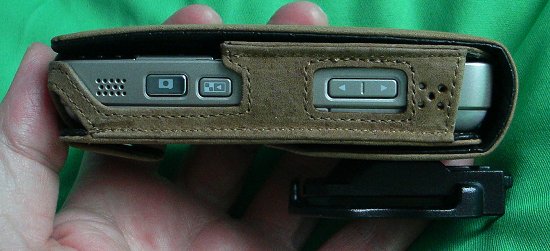
Steve Litchfield from All About Symbian created a great article a while back ago looking at a few different cases and coveres for the Nokia N82. Out of the six cases he reviewed my favorite was the Noreve N82 Tradition case. The brown leather would look so good protecting the black N82. Check out the image below...
Click here to check out the article.
Do you keep your N82 covered or protected?
If your interested, check out this link at Amazon for some great prices on Nokia N82 Cases & Covers
Thursday, February 7, 2008
A Stand For The Nokia N82 - Nice Find By The Nokia Guide

Would you find this a good accessory? I would love having this if it also charges your phone or acts as a usb cable for your computer, similar to an iPod cradle. I can't tell if it does or not, that will be awesome if it does. If it doesn't charge your phone, then I really see no use in getting this thing, I'd rather just set my phone down on the table. What do you think?
Either way, check out this article at The Nokia Guide for more information on this product.

