Showing posts with label N82 Freeware. Show all posts

Saturday, July 25, 2009

A Handful Of Google Apps Updated For N82, Including Youtube


If you’re a Google service user you should be happy know that you now have a nearly complete package of tools to make your N82 sync perfectly with your Gmail, Calendar, Contacts, and Maps. There is even a new Google App for the N82 which lets you have another set of Google shortcuts on the homescreen by using the (C) button instead of taking up pressure space. Let’s start with the Google App.

Google App For Mobile

n82-google

If you already use Google applications like Gmail, Maps, Youtube, the Reader website, etc on your N82 then the official Google Mobile App is for you. What is does is creates shortcuts to all the applications you use in one place and also gives you opportunity to search Google and launch your web browser. Use the delete key from the homescreen to open the screen above for quick access to your Google shortcuts and Search.

Google Maps For N82

n82-google-maps

Google Maps for Mobile has been updated in a huge way. They have now implemented something called Layers which lets you add layers of information on top of the maps. This includes traffic alerts & incident reports, points of interest with wikipedia information, and especially cool is your own maps that you’ve added from your PC. Below is an example from Google of how My Maps works for mobile.

photo oppty

Layers on the Map: Latitude locations + My Map

Since my wife and I love participating in cycle touring events on our tandem bike, we thought our challenge for this year -- 1500 KM of riding in Audax UK's Super Randonneur Series -- would make for a great environment to test the Layers functionality while on the go.

The first thing we wanted to try was My Maps. This feature on Google Maps on desktop becomes even more useful with the ability to access them from my phone. We're not alone in wanting this -- it's the fifth most requested feature on the Google Mobile Product Ideas page. It was great to trace bike routes and add places to stop on the computer, add the My Maps layer in Maps for mobile with a few clicks, and see them up on my Nokia S60 handset from our bike.

Seems cool right? I’m personally loving the new version of Google Maps.

Youtube Application For The N82

Screenshot0008

Youtube for the N82 has been updated to run faster and smoother. I showed this application to you awhile back ago, so if you haven’t updated be sure to get it done. It’s a real Youtube application in the native Symbian .sis format, not a watered down web version.

Get The Latest Applications

To get all these updates visit http://m.google.com/maps  for your N82’s browser.

To learn more about this from your pc visit this link.

Continue Reading...

Tuesday, July 14, 2009

N82 Photo Applications: Nokia Updates A Few From Beta Labs


Wow it's been awhile since I posted here. In case you haven't been following Nokia Beta Labs, they've recently updated a few of their photo gallery applications and both are very promising and would serve as a good replacement for the built in gallery.

Nokia Photo Browser

Browse your photos with stunning 3D effects

Nokia Photo Browser is an experimental photo browser that makes your viewing experience quick and fun:

* Pleasing visual effects
* Intuitive touch UI
* Magnifying glass
* Face browsing


Link

Nokia Image Exchange

I really like the interface on this application. Everything is very smooth and crisp, and transitions are very nice. A big plus is you can automatically backup your images to the Nokia Image Exchange server. You can never have enough backups.

Description:

Nokia Image Exchange is an exciting, experimental image gallery to make browsing and sharing images fun and easy. It aims to provide a seamless integration of a mobile image gallery application and a corresponding web-service. Image Exchange explores user experience when the mobile phone is enabled with an always-on data connection and utilizes existing contact information as a basis for social networking.


Link

Have you tried out either of these photo applications for the N82? Which do you prefer?

Continue Reading...

Wednesday, April 29, 2009

Want Time Anywhere On The N82? Check Out FreeTimeBox


Ever since my watch broke a few months ago my Nokia N82 has taken over the duties of my time checking. But I need to see the time from any screen, not just the homescreen. I went on a while goose chase and found a solution called FreeTimeBox.

I knew there was already an application called Timebar, but this app was unsigned. I hate dealing with unsigned apps so I’ve been on the lookout for one that you can install without any problems. This is where FreeTimeBox comes in to rescue us. I’ve had it installed on my N82 for a few weeks and have come to rely on it. Great thing is this application is already signed!

For some reason I cannot take screenshots for examples, the time doesn’t show up on the image after I take it. Below is how it looks on my Nokia E71…

04222009118

If you’re wondering why I’m not showing you how it looks on the N82 it’s because I took the picture with my N82. If I try to take a picture of the N82 with my E71 it looks like utter crap. E71 camera sucks. Right now the N82 is the only good camera I have.

Say you don’t want the time to show up on a certain application. For instance it automatically shows on the homescreen. Obviously I don’t need that. Go into the settings and you can “blacklist” certain applications. To find this setting go to Settings > Time Display > Black/White List Apps.

You can also configure the position of the clock (if you want it on the top that works too!), which pre-installed font is used, the font size, color, bold, italic, opacity, background color, seconds, time format, and a whole lot of sync settings. I’m unsure exactly what the sync settings do. Maybe sync the timezone of your N82 with the current location? I don’t use this feature.

Click here to download and enjoy!

Continue Reading...

Friday, March 27, 2009

Upload Photos To Facebook From Your Nokia N82


In case you've been living under a rock for the past few months, Facebook has become an internet phenomenon that you can't hide from. It's a great place to share stories, photos, videos, and status with friends who you might or might not see all the time. The mobile version of Facebook's website is decent enough to use for comments and status updates, but photos have been left in the dust for Nokia S60 handsets. Besides the mobilized Facebook website, N82 fans really don't have a lot of options to follow their friends via their devices. There still is not a decent Facebook application available for S60 users, although one is in the works.

The makers of Shozu have integrated Facebook into their popular application, making it easy to upload photos to your "Wall" and albums, either on the spot or after the photo is taken or later when you get a chance. I've tested this out over the past few weeks and so far it works very good.

If you don't have Shozu already get it from www.shozu.com or m.shozu.com from your N82's browser. To set up Facebook with Shozu you must have access to the PC version and login to your Shozu account.


Follow all the correct steps, then let the application on your device set up everything properly. After that you should be good to go.


As you can see in the second screenshot you can also update your Facebook status and view your friend's status. I don't think their is a way to comment on other people's status right now with the Shozu applicaton.

Do you keep up with Facebook from your Nokia device? What methods to are your favorite? Have you tried uploading photos to Facebook with Shozu?

Continue Reading...

Friday, March 20, 2009

N82 Gets An Official Youtube .sis Application - Stream Video To Your Smartphone


Yesterday Youtube made available a native Symbian S60 application in the form of .sis format. This means we'll now have an extremely smooth and fast application for our N82 and Youtube needs. In the past I've used Mobititubia for my Youtube fix, but it's extremely slow over Edge/GSM. This new Youtube application is a lot faster, although you might suffer some quality loss if you don't use 3g or WLAN. To be honest it is still bearable and good for looking up videos quickly while on the go if all you have is Edge.

I don't have a working N82 right now, it should be here tomorrow. So my experience with this application is limited so far. For now you can check out some screenshots I took from my E71. The interface is gonna be very similar.


Let me know how it works out on the N82. I only tried it briefly, and didn't even get a chance to see if the auto-rotation works with the N82's accelerometer.

Download: http://m.youtube.com from your N82 browser.

Continue Reading...

Monday, February 9, 2009

Nokia Maps 3.0 (beta) Updated, Now Works WIth N82


Nokia Beta Labs has just released an updated version of Nokia Maps 3.0 which allows Feature Pack 1 devices like the N82 try out. I won't be installing it on my N82 just yet as I'm currently using the Nokia 5800 full time for review. Probably the biggest updated in Maps 3.0 over the current 2.0 is the ability to lay out your route on the Ovi.com website from your PC before a trip or long day of travels, as pictured above. Funny this comes just after the recent release of Google Maps. The differences between the two applications are obvious. So far Google Maps is doing a better job of search results and quick lookups, while Nokia Maps is better for turn by turn directions and pre-planned trips.

Check out the details from Beta Labs...

Hi all,

Firstly, our Maps team would like to thank those who have provided feedback, bugs, blog entries, suggestions and surveys over the last few months - This has been extremely helpful in enhancing and “fine tuning” the product – so please keep them coming in! :-) We do review all of your suggestions and where possible we look for opportunities to build them into the product.

Now to the exciting stuff….the Nokia Maps Team is pleased to announce an updated release of Maps 3.0Beta. One of the eagerly awaited news is that this updated version now supports S60 3rd Edition Feature Pack 1 devices and N96!

In addition to this, there are also some new features/enhancements to the previous release:

  • Start-up sequence takes you to your current position as soon as position is found. If your position is not found in few seconds, you are taken to last known position
  • You can rotate the map, so you can for example view 3D landmarks from all directions. Just press 4 and 6 in map view. Pressing 5 takes you back to ‘north up’ view
  • In 3D view mode, you can tilt the view by pressing 2 and 8
  • 2D/3D mode works with all map modes, i.e. with Map/Satellite/Terrain
  • My Favourites menu is cleaned up and History list is moved higher in menu
  • My Places has option “Point me to” for any saved place/landmark, you the direction to that place on the map
  • In addition to the synchronisation of Favourites and Collections with Ovi MapsBeta and vice versa (use in online mode, enable Internet connection), you can now plan routings on Ovi MapsBeta and synchronise to your device
  • Finally, many bugs have now been fixed

Maps 3.0Beta works with all Nokia devices based on:
S60 3rd Edition Feature Pack 1 (E71, E66, 6110 Navigator, N95, N95 8GB, N82)
S60 3rd Edition Feature Pack 2 (N96, N85, N79, 6650, 6210 Navigator, 6220 Classic, N78)

Try it out for yourself and let us know feedback!


Check out the video demonstration...


Once again, I won't be trying this out for a few more days. Use at your own risk and remember that it's still in beta, be sure to leave your comments/questions at the Beta Labs blog. Let us know what you think of the application, I'm curious to hear from all of you.

Click here to find the download page.

Continue Reading...

Wednesday, February 4, 2009

Google Maps Updated: Find Your Google Friends On A Map With Latitude


One of my favorite applications on my N82 - Google Maps - has just recieved a huge updated. You can now login to the maps application and see where your other Google buddies are on the map in real time. Great for meetups, parties, or checking on a loved one. This new service is called Google Latitude and brings a welcome competitor to Nokia's beta applications like FriendView and Chat.

Description of Google Latitude:

With Google Latitude, you can:

See where your friends are and what they are up to
Quickly contact them with SMS, IM, or a phone call
Maintain complete control over your privacy
Enjoy Google Latitude on your phone, PC, or both.

Latitude is a new feature of Google Maps for mobile, as well as an iGoogle gadget, that allows you to share your location with your friends and to see their approximate locations, if they choose to share them with you. You can use your Google account to sign in and easily invite friends to Latitude from your existing list of contacts or by entering their email addresses. Google Talk is integrated with Latitude, so you and your friends can update your status messages and profile photos on the go and see what everyone is up to. You can also call, SMS, IM, or email each other within the app.

Check out the video...


So far I'm really digging the "ease of use". If they would enable some sort of Gtalk instant messaging like Contacts on Ovi from Beta Labs has, we'd have some serious issues. Already this is huge because non S60 users can take advantage of this, unliked Friendview or Ovi Contacts which requires other people to have a S60 device.

For privacy issues, you can turn off this feature or preset your location:


Other than the new latitude feature, I haven't really noticed any other changes or enhancements from the previous Google Maps version.

Download: http://www.google.com/latitude

Continue Reading...

Tuesday, January 27, 2009

More Last.fm Love: Fring Adds Support, Mobbler Gets An Update


For all of you music junkies out there (including myself) and those who have small music libraries but love internet radio, you should be happy to hear that a new way to enjoy Last.fm has just been added to the N82.

The popular Skype/IM application Fring has just been update with addon support for Last.fm functionality. I haven't tried out this new feature myself, but here is what the official Fring blog has to say...

You can search & tune-in to your favorite artists, view album artwork, skip tracks you don’t like, even show your love or ban them, and all of this activity via fring will automatically update your Last.fm online account.

So, where does the friends bit come in? Well, in case you didn’t know, at fring we love nothing more than a great big mash-up. So as well as the music experience itself, we’ve grabbed all of your Last.fm friends and put them into a dynamic friends list so you can view what they’re listening to on Last.fm, in real-time, right now. Cool huh?

A video demonstration...


I'd say it's pretty darn cool. Check out fring.com for more information.

Move Over Fring, Mobbler Still Rules

Let's now move onto my favorite Last.fm solution, Mobbler. This application has really taken shape since it's first release and has been molded into a beautiful application that looks like it's built into the S60 phone by default. I've already talked about this app before, for some of you new to this site. These newest updates have been around for awhile now, I've just lagged on informing you guys. Check out the changelogs...
A summary of changes to Mobbler.

0.3.4 - Fixed some major problems in 0.3.3

* Many people had problems with 0.3.3 mainly on E series devices (phone rebooting when skipping track etc) this was down to incorrect use of the audio equaliser which has now been fixed
* This release should also finally fix the problem with installing the downloaded update.

0.3.3 - Improved audio playback performance

* No audio skipping when using other applications! (audio player is now in a separate thread)
* Start buffering the next track when the current track is still playing, but has finished downloading
* Added an audio equaliser
* Export the track queue to a log file to be uploaded by scrobble uploader on a PC
* Can now pause the music player and this is not counted as stopping the track - long tracks like podcasts were being scrobbled multiple times when paused because of this
* Other minor improvements and fixes

Click here to visit the Mobbler homepage.

* Keep in mind both of these applications use a lot of data. I, Mobbler, nor Fring are responsible for your phone bill if you don't have an unlimited data plan.

Continue Reading...

Wednesday, December 31, 2008

Nokia Beta Labs Working Overtime, Many Applications Updated + Nokia Image Exchange


Not letting the holidays slow them down, the fellas over at Nokia Beta Labs have been extremely busy pumping out updates after updates before the new year. Because of my lack of time I haven't been able to try out all these updates, but I'll at least let you know what's been going on over there. Read more to see the updates...

Conversation Application - Threaded SMS

Conversation is an add-on application that allows you to follow your communication with contacts as streams of conversations, which it organizes, based on individual contacts. The application also makes it very easy to reply to received messages and continue an ongoing conversation with the contact.
More...


Nokia Audio Books
For client UI, there are some small but nice improvements. You can now enable normal clock in UI view, so there is no need to do any task switching to go to idle screen to look what time it is. This has been sometimes irritating because at least I am using my phone also as a clock and have to check time many times when using audiobook client. Also sleep timer is improved and you can now set it for different time intervals. You also get status display showing in minutes, how much you have time left in sleep timer. Also if you have book with length more than 24 hours, the UI is now displaying the time correctly. At least in Finland, there are many good books with duration of 24 hours or even more. In English markets, unfortunately books are too often butchered to abridged versions of couple of hours, which should be capital crime.
More...


Step Counter - For Exercise
Our first update of the Nokia Step Counter, which was originally released on May 9th 2008, offers two significant improvements frequently requested by users on the Beta Labs blog: better power management and support for some new S60 products. Here is a list of the new features.

* Support for the following S60 products: N95, N95 8GB, N82, N93i, 6210, N79, N85, N96
* Export of step data in CSV format (in Diary, select Options -> Export To File)
* Sound notifications (in Settings, General, Sound Notification. Use your own alert sounds by replacing alertsteps.aac and alerttarget.aac in E:/StepCounter/AlertSounds)
More...


Nokia Email Service Graduates, Now Part Of Nokia Messaging
Here are the highlights of this release:
* Support for Yahoo! Mail
* Support for more Nokia S60 phones
* Support for up to ten email addresses
* Support for subfolders for IMAP email accounts
* Support for Google Apps hosted email and other vanity domain email addresses
* Flagged messages will automatically become starred messages in Gmail
* More intuitive inbox navigation via a discoverable control bar
* Faster opening of inbox
* Sent email will be synced to your webmail’s sent folder for all email addresses
More...


Enhanced Calculator Updated, Archived
We have now made the final update to Enhanced Calculator for S60. Some minor issues have been fixed - including the compatibility issue with Nokia N96. Hope you enjoy it!
More...


Nokia Image Exchange - A New Way To View Photos

This is experimental, and something I've yet to install. As soon as I have time this new application will be on my device, hopefully this afternoon.
Nokia Image Exchange is an experimental imaging service to make browsing and sharing images fun and easy. It aims to provide a seamless integration of a mobile image gallery and a corresponding web-service. Image Exchange explores user experience when the mobile phone is enabled with an always-on data connection and utilizes existing contact information as a basis for social networking.
More...


That's most of the recent stuff. Check out www.nokia.com/betalabs for more.

Have you tried out any of these new or updated applications?

Like I said I'm particularly interested in Nokia Image Exchange. I would love to see a small review in the comments below if any of you have already tried it.

And lastly... HAPPY NEW YEAR to all of you!

Continue Reading...

Tuesday, December 9, 2008

Slick IM Updated - My Favorite S60 Instant Messenger Now Has Full Theme Support


I've always been a huge fan of Slick Instant Messenger because of the amazingly simple layout that makes sense on a mobile device and the stability of the application. The customization is great and all the necessary IM protocols are included. Since I very rarely use Skype calling I don't need to always use something like Fring or Nimbuzz.

Slick IM was recently upgraded to include full theme support, one of my most wanted features in the past. Before the interface colors were customizable but never really blended well with my theme. Read on for more information...

Features:

  • Supported protocols: ICQ, Yahoo, AIM, MSN, Google Talk, Jabber
  • Text messaging
  • Emoticons
  • Alerts - sound, backlight, vibration, notify window displaying number of new messages
  • Group and buddy management (add, delete, rename)
  • Message history
  • File transfer - send and receive files
  • Sending / receiving offline messages
  • Downloading files sent as links
  • More features to be added
Another important feature is Access Points. You can specify your main access point which is my home WLAN, and an alternate access point which is my AT&T data connection.

All of these features and the recent update with theme support makes Slick IM the best instant messenger experience for the Nokia N82, in my opinion. Not to mention it's FREE!

Click here to download Slick Instant Messenger.

If you already have it installed launch it and go to Options > Tools > Program Update.

Are you also a fan of Slick IM? If not, what S60 instant messaging application do you use?

Continue Reading...

Wednesday, November 26, 2008

Opera Mini 4.2 Now Available For Nokia N82


Ok, I may be a little late here, but here's a heads up for those who haven't heard about this yet. Everyone's favorite mobile browser, Opera Mini has been updated to V4.2 (official). A couple of great improvements including an even faster performance, support for skins, YouTube's mobile version, and notes syncing between PC and Opera Mini. I also noticed that the left and right soft key labels in landscape mode have been fixed. I remember before, both the labels are positioned at the bottom, which is quite confusing.


Quoted from the Opera Mini site:

New in Opera Mini 4.2
  • Skins: Personalize Opera Mini by choosing a new colorful skin.
  • Video: We are working to make video content available on more phones through Opera Mini. If you have a new Sony Ericsson or Nokia phone, the chance is high that you can take Opera Mini for a spin on m.youtube.com.
  • Performance: Opera Mini 4.2 can use our newly established server park in the US. This means significantly faster page page downloads for users in the Americas and Asia-Pacific region.
  • Sync your Notes: Opera Link support for notes, allowing users to sync their notes between the PC and Opera Mini.
If you haven't tried this browser yet, I highly recommend it. Read: it's fast! Even on GPRS connection, this browser still packs a punch.. Forget the built-in s60 browser unless you need to browse websites with flash contents or those that requires client side scripting such as interactive web services.

To download directly from your phone, go to mini.opera.com. Or click here to download the .sis file to your pc. (UPDATE: N82 is nowhere on the list yet. You can download the N95 version which worked for me but the application's menu icon is very small and looks out of place.)

Are you a fan of this browser? I am. It is one of the best java applications available today.

Continue Reading...

Monday, November 24, 2008

New S60 Game: Frozen Bubble - Twisted! Make Use Of The Accelerometer


One of my favorite free S60 games has just been updated thanks to one of the top Symbian S60 developers - Samir. The popular game Frozen Bubble has been re-created using the same great gameplay, only now the frozen bubble launcher direction is controlled by the accelerometer of the Nokia N82.

What is Frozen Bubble?

Frozen Bubble is a popular free puzzle game, ported to almost all platform. User controls a small canon, shooting bubbles and tries to hit other bubbles so to create groups of 3 or more bubbles of the same color. Whenever this is accomplished these bubbles go away. The purpose of the game is to eliminate all bubbles from stage.

Some may say they like the original S60 version of Froze Bubble better which uses the d-pad to control the launcher, but I think the new accelerometer control adds a whole new element to the game.

About the new Twisted version, straight from Samir himself...
New functions added to Elias Konstantinidi version.

- Accelerometer : Use accelerometer sensor to play and to set settings : "Twist" your phone left and right and press a key to launch the bubble.
- Dynamic volume and balance : Change music behaviour according to phone position.
There is 2 options :
Volume : The more you rotate your phone, the more volume will be less.
Balance : Stereo balance change according to phone positions (better with earphone ).
- You can set you own music by putting a file called fbtwisted.mp3 in c :\Data\Others
- Dynamic backlight intensitivity: Dynamically change backlight intensitivity according to phone position
- Vibration: The more you explosed bubbles, the more vibration duration will be high.
You have to enable vibration on your phone settings and unplug usb cable to get this option working.
-Some bug fixs


Click here to visit AikonLab and download Frozen Bubble Twisted. While you're there be sure to check out two other applications that Samir is working on - HandWave and nAlertMe, which I'll be talking about soon.

Continue Reading...

Saturday, November 22, 2008

Get Your Exact GPS Location With An Application Already Built Into Your N82


I often overlook some of the applications that you can find in under the N82's "Tools" and "Utilities" folders. Buried there is an application called GPS Data which gives you all the details of your current location in the world. This isn't a Maps or Tracking application - it's just there to give you details about your current location.

Obviously this information isn't handy for day use, but it's nice to know it's there. Pilots, hikers, navigators, explorers would find this useful. There is a handy Navigation part of the application which lets you specify a location and it lets you know how far away it is and which direction to go. Very simple, learn more below.

Screenshots and details...

GPS Location


Latitude & Longitude, Altitude, Speed, etc are shown.

Trip Distance


This allows you to keep track of a trip, walk, run, etc if you don't need something like Sports Tracker. It keeps track of your distance, time, speed, etc.

Navigation


This feature shows you which direction you are heading and allows you to set a destination, which shows up as a dot on the compass. As you can see I'm heading in the wrong direction. Destinations can be selected from coordinates or landmarks in your Nokia Maps or Google Maps application.

Whether or not you find this application useful, it's nice to know that it's there.

What other hidden gems have you found on your Nokia device?

Continue Reading...

Monday, November 17, 2008

Automatic S60 SyncML Application "Swim" Updated - Crucial Scheduling Bug Fixed


Hi all! Last week I showed all of you a wonderful yet simple new application called Swim that allows you to sync your N82 device to your SyncML setup automatically in the background - without you having to do anything. This means if you have Ovi Calendar, GooSync, ScheduleWorld, Zyb, etc. working on your S60 phone you no longer have to manually sync.

The developer has just released an updated version of Swim, fixing a huge bug that caused the sync to happen every 30 minutes, no matter what intervals you chose. You can specify it to sync every 15 minutes, hour, 4 hours, 12 hours, and Daily.

Best of all - it's free, although donations are encouraged.

Click here to visit the Swim download page where you can get further downloading instructions.

Continue Reading...

Wednesday, November 12, 2008

S60 App: Automatically Sync Ovi Calendar, GooSync & All SyncML Calendars With Swim


I just recently found a new application called Swim, and it's really been saving my butt this week. It's a very simple application and brings functionality that Nokia should've implemented already. Nokia S60 devices such as the N82 allow you to set up SyncML configurations to keep your notes, calendar, and contacts in sync with compatible services such as GooSync, ScheduleWorld, & my favorite Ovi Calendar. The only problem WAS that you had to manually sync your calendars every time you make changes, instead of the N82 automatically performing the sync in the background periodically. Not Anymore!

This is where Swim comes in. It's a very simple application - but does it's job very well. It lets you automatically sync to your Ovi Calendar or other SyncML setup periodically. You can specify it to sync every 15 minutes, hour, 4 hours, 12 hours, and Daily. I currently have mine set to sync every 4 hours which is perfect. Keep in mind with services such as Ovi Calendar you can also sync your notes and contacts, allowing you to be able to edit all of this from any computer with an internet connection. Really handy!

Apparently there is a small bug right now that makes the sync happen every 30 minutes, which really isn't a big deal since it happens in the background and uses very little data. The developer has stated on his website that he is working on this bug and it will be fixed soon. Keep in mind this is the first release of the application.

Thanks to the S60 Developer Community the holes that Nokia leaves are resolved once again. If you think this application is as useful as I find it, leave a small donation with the developer so he can continue making it work better. Afterall, it's FREE!

Click here to visit the website & download the application.

Continue Reading...

Tuesday, November 4, 2008

My Favorite Task Manager Jbak Taskman Gets Updated To 1.0


In case your new to this blog or just haven't read my article about why I love Jbak Taskman and how it's changed the way I use my N82 - then you gotta read it here. It's become my favorite application that I really can't be without. Every time I get a new device to test out I install it, as well as recommend it to new S60 fans. It replaces the menu key on my N82 - instead of going to the S60 Menu I am now taken to the Jbak screen where I can see open applications and tons of my favorites all on one screen.

It's recently been updated to version 1.0 and is already Symbian Signed. No need to have to worry about certificates. There are a few really good improvements over the last version I showed you. My favorite - now you can make shortcuts to specific contacts, emails, url, sms, and mms.

Example - you can create a one-touch shortcut to text a specific person, and even have pre-written text at the beginning (or end) of the sms if you'd like for common contacts. You can create a whole new set of shortcuts to direct urls that will open in the S60 browser. The possibilities are endless.

You can see all open apps, hide apps, view chunks & processes (for developers) - all this will help maintain your phone alot better.

Like I said - when I push my menu button it no longer takes me to the S60 menu. Instead it goes straight to Jbak and I have my first shortcut as the S60 menu just in case I ever need it. Of course if you'd rather keep it normal you can just have Jbak open after a Menu longpress to see open tasks and more shortcuts.

This new version is also better at handling memory and keeping your phone stable.

Check out the official feature set straight from Jbak:

- Ultimate replacement of standard task list, which called by menu-key long press.
- Customisable quick launch, where you can add program, document, phone number, SMS and e-mail.
- List of all programs in your phone with quick search by name or UID.
- List of processes, threads, chunks with quick search.
- Quick and stable termination of busy tasks.
- Autorun of programms.
- Phone reboot.
- Uninstalling of sis-applications.
- Info about free memory.
- Clocks with seconds and date with day of week.
- Detailed information about runned task, which you can copy to clipboard.
- Quick task switch by pressing and holding menu-key (Smooth task switch)
- Remember last-visited position in system phone menu.
- Detailed setting of menu-key
- Powerfull possibilities for power and memory saving

>Click here to download the latest version of Jbak Taskman for your N82. To get the most out of the application make sure to spend some time going through all the settings and tailoring it to your needs.

Do any of you use Jbak similar to the way I do? Or do you simply love Handy Taskman so much that you won't switch over to Jbak?

Continue Reading...

Wednesday, October 29, 2008

Gmail Application Updated - Get Version 2.0 For The N82


Do you use the Gmail application? If so - you might want to get the latest version. It brings lots of improvements including Google Apps accounts, multiple Gmail accounts, faster everything, and a cleaner layout.

Check out the official changelog...

- Overall performance improvement: You should experience significant raw speed improvement, smoother scrolling, and no freezing.

- Multiple accounts management: If you have both a Gmail and Google Apps email account, you can easily switch between them quickly. You will no longer have to use two different mobile apps to access personal and work emails.

- Multiple mobile email drafts: You can save multiple email drafts in your mobile phone, so that you can pick and choose what you would like to send later.

- Powerful shortcut keys: If you have a QWERTY phone, you can use shortcut keys. Hit 'z' to undo, 'k' to go to a newer conversation, and 'j' to go to an older conversation. See Menu/Help in the app for more shortcuts.

- Basic offline support: Can't get a signal? Not a problem. You can compose and read your most recent emails even when there is no signal. Also, any outgoing messages will be saved in the outbox on your phone and sent automatically when you're back in coverage.

A Gmail engineer says,

Our focus for this version was to make the experience faster and more reliable. We rearchitected the entire client to push all the processing to the background, greatly improve the client-side caching scheme and optimize every bottleneck piece of code we came across.

Personally I don't use this application for my Gmail needs, I've been using Nokia Email Service instead. But I always keep this Gmail application on my phone just in case the Nokia server is down or I need to search for archived emails or dig up a contact in my Gmail account. It's really handy just to have. If you don't need real push email to your phone then this application is perfect for checking email once or twice a day.

Download: Go to m.google.com/mail on your mobile browser to download the new Gmail for mobile for your phone. If you already have Gmail installed be sure to remove the version you have before installing this new version.

Do you use this mobile Gmail application, or simply rely on another solution to retrieve your Google Mail on your Nokia N82?

Continue Reading...

Sunday, October 26, 2008

N82 Last.fm Application Mobbler Gets A Crucial Update - Now Looks And Works Better Than Ever


If you haven't heard of Last.fm and you love music, then your probably living under a rock. Last.fm is a social music website that allows you to specify your favorite type of music then it streams those artists and similar artist to your customized radio stations. Sometimes you'll get crappy songs and you can ban them and other times you'll find new music you love and "love" them. Using a free application called Mobbler you can stream your Last.fm stations to your N82 for when your sick of your mp3's on the memory card. Below is how the developers describe Mobbler...

Mobbler, Mobile Scrobbler, is a last.fm radio player and scrobbler for Nokia S60 3rd edition smartphones. It allows you to listen to your last.fm radio stations and to scrobble tracks played using the Nokia S60 Music Player. Music player scrobbling can be done both whilst you listen, or queued offline to be submitted later.
Here's whats been updated to the Mobbler application...


0.3.0 - New graphics, bug fixes, and check for updates feature

* The graphics in Mobbler have been updated with help from several Mobbler users (Still needs a Mobbler specific logo and the positions for landscape displays are not finalised)
* Some bugs fixed that were in 0.2.4 like having to enter your username in lowercase, and crashing when there was an error trying to connect
* A check for updates feature has been which will download the latest version of Mobbler through your browser if it is newer than the currently installed version
* Changed so that there is an offline and online mode instead of connecting and disconnecting. This is so Mobbler can remember that you were in online code and try to automatically connect the next time it is started. (Need to allow the user to select a default access point to get this working properly though)

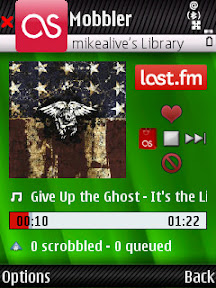
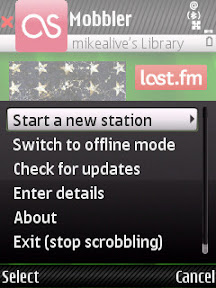
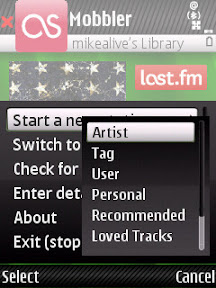
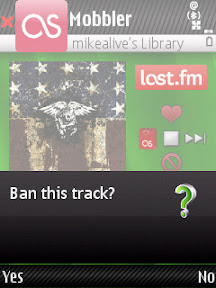
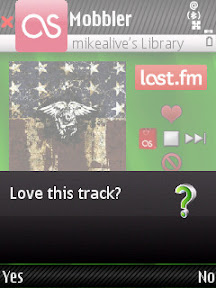
I took some screenshot of Mobbler on my N82 (I'm sure someone will ask me "what theme is that"). Check them out below:

When the song is playing....


Start a new station...


How to start the station...


Ban tracks that you don't like...


Specify the ones you love...


If you've never used Last.fm before than you'll have to go there and create an account to start listening. And like always, make sure you have a data plan with your carrier.

Click here to visit the Mobbler website, or click here to download the latest application directly.

Have any of you tried this out yet? What are your thoughts on the latest version of this great music application?

Continue Reading...

Thursday, October 23, 2008

N82 & Weather - Is A Storm Coming? I'll Just Check My Device!


For me, living in sunny Southern California a weather application on my N82 is not necessarily crucial because most of the time it's about 75 degrees and sunny at this time of the year. I think yesterday actually hit the upper 80's in the LA area. But I know some people don't have it so good, always having to battle snow, rain, and extreme temperatures. Nothing is worse than going outside unprepared for a huge storm coming your way.

This is where a good weather application is needed.

Weatherbug For S60

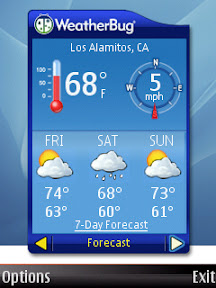
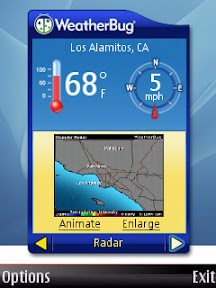
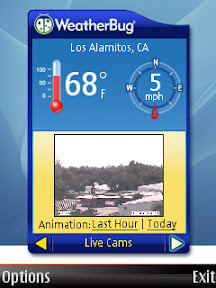
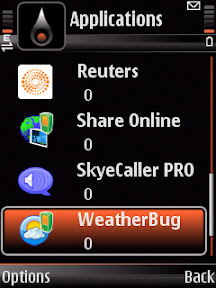
My personal favorite (and free) solution is the WeatherBug S60 Widget. It loads just as fast as any application on my N82 and gives the basic weather report and a simple 3 day forecast. Check out the screenshots...

Current Conditions & Forecast


Current Radar Image


Current Weather Camera Image


Those are the only three aspects of this application. Again, it's just basic and to the point. You have links to the 7 day forecast and animated radar images that will take you to the weatherbug site in your web browser.


The WeatherBug widget for S60 is available in the Download! application of your N82.

But what if you want something better and more detailed?

Handy Weather For S60

I personally haven't tried this application, but I know it's extremely popular and loved. Check out some of the features:

Handy Weather will keep you connected with updated forecast anytime anywhere. All you need is wireless Internet compatibility to get weather news and forecast for 40 000+ preset cities worldwide and for any arbitrary location by coordinates. 10X faster than a browser! 10X easier! 10X less traffic!


Features:
  • Four handy and good-looking views: 5-day weather forecast, 5-day temperature graph, current conditions and detailed forecast for several locations you’ve selected.
  • 3 types of weather maps: the Temperature map presenting the weather chart of the selected zone shown by shades of blue, yellow and green, the Pressure map displays pressure space and depression areas. And also you will find a Satellite map of various parts of the world.
  • Complete wireless weather coverage available: high and low day temperature, weather type icon and text, wind direction, UV index, humidity and more…
  • Automatic update forecast (every 4, 8, 12 or 24 hours or at preset time)
  • Weather data is provided by the Intellicast, the world’s leading meteorological company


    Get your free trial from The N82 Blog Store right now and if you like it you can purchase a one year license. Click here for the link.

    How do you check the weather on your Nokia N82? Is this something that is important to you, or just a luxury and "nice to know". Do any of you have experience with either of these applications?

    Continue Reading...

    Wednesday, October 15, 2008

    Nokia Email Beta 3 Now Available For N82, Multiple Accounts Supported


    A few weeks ago I wrote an article about the new Nokia Email Service which is still under the beta phase. They recently updated the application to version 3 and now officially support the Nokia N82.

    They also now have support for multiple email address and include a lot of bug fixes that have to do with the servers and email retrieval. Overall I've been pretty happy with this release as it seems to be giving better battery life to my N82.

    Here is what Nokia Beta Labs have to say about the update...

    Today, the Nokia Email service team is proud to announce the first updated beta release. Nokia Email service is designed for Nokia device owners to make mobile email easily discovered and intuitive. Since we launched on August 8th, we’ve received thousands of questions, suggestions and positive feedback about Nokia Email service. We’re pleased to say that we’ve taken four of the most popular feedback requests from our users and implemented them in this release.

    * Localization. We’re now localized into six different languages, including full support for international characters, which has been a very popular request from our beta testers from all around the world. This release localized in English, Finnish, German, Dutch, Latin American Spanish and Iberian Spanish.

    * More email addresses. Now Nokia Email lets you get mail from up to 6 email addresses, each in its own mailbox yet all in one place, and makes composing from any account seamless.

    * More phones. Nokia Email service is available on more of the most popular Nokia S60 devices, including many of the latest S60 3.2 devices like the N96 and the N78.

    * Better mailbox management. When you delete an email on your Nokia phone, it will be deleted from your email account. We’ve enabled this for both IMAP and POP accounts.

    David also goes on to talk more about the upcoming features that people have been asking for.

    I recently wrote up an article at Symbian-Addict.com giving my detailed thoughts on the updated application. Click here to see that and get a better understanding of what's included and not included in this update. Obviously this application is meant for those heavy email users who need there mail the second it arrives. If your a more basic email user and only receive 5-10 emails a day then maybe the built in email application is good enough for you.

    Go to email.nokia.com to get the latest version on your N82.

    Do any of you use this? What are your thoughts. Be sure to also tell the folks at Beta Labs your thoughts since this application is not the final product and is still being improved.

    Continue Reading...