Showing posts with label N82 Applications. Show all posts

Saturday, July 25, 2009

A Handful Of Google Apps Updated For N82, Including Youtube


If you’re a Google service user you should be happy know that you now have a nearly complete package of tools to make your N82 sync perfectly with your Gmail, Calendar, Contacts, and Maps. There is even a new Google App for the N82 which lets you have another set of Google shortcuts on the homescreen by using the (C) button instead of taking up pressure space. Let’s start with the Google App.

Google App For Mobile

n82-google

If you already use Google applications like Gmail, Maps, Youtube, the Reader website, etc on your N82 then the official Google Mobile App is for you. What is does is creates shortcuts to all the applications you use in one place and also gives you opportunity to search Google and launch your web browser. Use the delete key from the homescreen to open the screen above for quick access to your Google shortcuts and Search.

Google Maps For N82

n82-google-maps

Google Maps for Mobile has been updated in a huge way. They have now implemented something called Layers which lets you add layers of information on top of the maps. This includes traffic alerts & incident reports, points of interest with wikipedia information, and especially cool is your own maps that you’ve added from your PC. Below is an example from Google of how My Maps works for mobile.

photo oppty

Layers on the Map: Latitude locations + My Map

Since my wife and I love participating in cycle touring events on our tandem bike, we thought our challenge for this year -- 1500 KM of riding in Audax UK's Super Randonneur Series -- would make for a great environment to test the Layers functionality while on the go.

The first thing we wanted to try was My Maps. This feature on Google Maps on desktop becomes even more useful with the ability to access them from my phone. We're not alone in wanting this -- it's the fifth most requested feature on the Google Mobile Product Ideas page. It was great to trace bike routes and add places to stop on the computer, add the My Maps layer in Maps for mobile with a few clicks, and see them up on my Nokia S60 handset from our bike.

Seems cool right? I’m personally loving the new version of Google Maps.

Youtube Application For The N82

Screenshot0008

Youtube for the N82 has been updated to run faster and smoother. I showed this application to you awhile back ago, so if you haven’t updated be sure to get it done. It’s a real Youtube application in the native Symbian .sis format, not a watered down web version.

Get The Latest Applications

To get all these updates visit http://m.google.com/maps  for your N82’s browser.

To learn more about this from your pc visit this link.

Continue Reading...

Tuesday, July 14, 2009

N82 Photo Applications: Nokia Updates A Few From Beta Labs


Wow it's been awhile since I posted here. In case you haven't been following Nokia Beta Labs, they've recently updated a few of their photo gallery applications and both are very promising and would serve as a good replacement for the built in gallery.

Nokia Photo Browser

Browse your photos with stunning 3D effects

Nokia Photo Browser is an experimental photo browser that makes your viewing experience quick and fun:

* Pleasing visual effects
* Intuitive touch UI
* Magnifying glass
* Face browsing


Link

Nokia Image Exchange

I really like the interface on this application. Everything is very smooth and crisp, and transitions are very nice. A big plus is you can automatically backup your images to the Nokia Image Exchange server. You can never have enough backups.

Description:

Nokia Image Exchange is an exciting, experimental image gallery to make browsing and sharing images fun and easy. It aims to provide a seamless integration of a mobile image gallery application and a corresponding web-service. Image Exchange explores user experience when the mobile phone is enabled with an always-on data connection and utilizes existing contact information as a basis for social networking.


Link

Have you tried out either of these photo applications for the N82? Which do you prefer?

Continue Reading...

Monday, June 8, 2009

Photofun really is Photo + Fun On The N82!


Hello guys, this is my second review, and now I'm reviewing a photo application called PhotoFun for Series 60 OS 9.0 or higher, PhotoFun is an entertainment software for people, who love to joke friends and laugh on and with them! Using PhotoFun you can make funny photos combining your mobile camera with different templates.

The latest version of PhotoFun was the v1.1, released in 23/09/2008, and there are up to 20 templates available to download.

In the settings menu you can set the picture quality at basic, normal or high, you can set the name of the pictures taken with the PhotoFun application by date or text, you can also choose to save the pictures either to the memory card or the internal memory.

PhotoFun comes with 2 resolutions available, one of 640 by 480 and a higher one of 1024 by 768.

My friends and I have come to think of it as a fun camera tool for those special moments, the fact that the resolution is good enough to send those funny photos via mms makes it great and you don't even have to crop the image.

It is very cheap too , at only $9.99 dollars for the Full Version at Symbian Guru!

You get all the fun at a very low price , plus you can create your own templates in paint if you like , and share them with your friends who also bought PhotoFun.

Here are some examples of this great photo application:

Movie Hero Template


Santa Claus Template

God Template


Hair Template


Circus Template


Cartoon Friends Template


Pilot Template


As you can see, you get quite a lot of fun, and I didn't showed you all the templates , they are a lot , and as i said before, you can create your own templates.

I hope you have come to like my review.

HAVE FUN!

Also i want to give a BIG thanks my friends who gave me permission to upload their pictures for my review.

Continue Reading...

Sunday, May 3, 2009

Love Watching Videos? Mobiola Video Studio Makes Encoding Simple On Your N82


When it comes to owning a mobile device most people have expanded from just using the handset to call or send text messages. The mobile device for the past few years has become something more, it has become a means for entertainment be it through music, videos, internet, or games. While I have been able to enjoy music, gaming and web on various Nokia's I never really got into watching videos/movies simply being that I did not have a solid program to encode video. I tried multiple programs including the one provided by Nokia in its PC Suite and had a miserable time. I was looking for a program that would satisfy three criteria; ease of use, advanced features for customizability, and quick encoding. Recently I was able to find this and would like to share a wonderful application called, Mobiola Video Studio.

Mobiola Video Studio is by far the easiest program I have used with the most flexibility. There are two versions of the application, standard and professional. While professional isnt necessary I highly recommend it because of its ability to tweak the details. But first let me explain how the program functions in standard mode then expand into what can be accomplished with the professional version. When opened for the first time the program allows you to choose what device you will be using this program for. After you select the manufacturer it will start up in two windows.


The menu is divided into two sections. On the left you are given a list of mobile devices based on the selection of manufacturer. The list is up to date and will have every model (even ones that are not released yet, ie N97). So you wont have to worry about having issues finding your device, if Nokia made it it will be in there. For a majority of the handsets there will be two choices, fast and quality. The difference between these is the size of the file, quality of the output video, and speed of encoding. If you have a larger memory card I would recommend using the quality settting. This will results in a better experience when watching your encoded videos. With the activation of the professional menu the application becomes a little more sophisticated and allows for users to customize the output file. This customization is highly recommended to achieve maximum quality from encoding media.


When the advanced menu is activated (available only in the professional version) the menu allows you to choose the format, control the video quality by choosing codecs, bitrate, fps, etc. This section will be mainly aimed at people who want to experiment and take their encoded videos further. I personally preferred this mode because it allowed me to get sharper picture quality in most of my videos with less pixelation. Once a selection has been inputted on how Mobiola will convert videos, it can be taken from three sources.


The source can be from a video file, DVD, or directly from YouTube. While each one works by choosing the source file then choosing a destination folder, the more intersting of the selections is the YouTube compatilbility. The program will directly rip videos from YouTube and convert them into files that you can watch on your mobile. It also has an option to download the high quality version if possible. The download and conversion work flawlessly. There is very little effort that is need to accomplish this. You just put the URL into the program select a destination for the output file and thats it.

Overall this application is easy to use, offers advanced features, and is quick to encode videos. Mobiola Video Studio is a must have for anyone thats considering or has ever wanted to enjoy videos on their mobile device. This application supports all phones. I conducted my testing on the Nokia E71, N82 and a computer running Windows XP. Mobiola Video Studio is availabe from The N82 Store. The standard edition is $24.95 and professional upgrade will be an additional $9.95. There is also a trial of this application available.

Continue Reading...

Tuesday, April 21, 2009

N82 And Twitter: Have You Tried Gravity? If Not, You’re Missing Out


It’s no joke that Twitter has recently taken the world by storm. But why be chained to the computer just to keep up with the internet world. The beauty of this new Twitter application called Gravity for the N82 is that you can control ALL aspects of Twitter when you’re on the go. I’ve been using it for about 3 weeks now and have come to love Gravity. I’d even go as far as saying it’s one of the best S60 applications I’ve ever used.

gravity1 gravity2

Overview of Gravity’s Features:

  • Compatible with Twitter and Laconica
  • All functions available on your S60 phone: tweet, reply, DM, follow & unfollow, create favourites, search, auto-update and many more …
  • Tabbed view of your Timeline, Replies, Messages, Friends, …
  • Setup and use as many accounts as you want at the same time
  • Twitter-Search section with multiple search tabs and Twitter Trends
  • Post pictures via TwitPic
  • Open URLs from any Tweet
  • Kinetic scrolling on S60v5 ( Nokia 5800 and Nokia N97 )
  • Theme support on S60v3 ( fixed dark and bright theme )

Having Gravity installed on your Nokia N82 really enhances the Twitter experience. I’ve reached more friends and gained more followers because I’m able to be online more often. Many readers from this blog follow me and ask me questions about their N82 throughout the day.

With that said – Gravity is probably the best $10 I’ve ever spend on an application for my smartphone. That’s right – it isn’t free but that is fine with me. It has been worth every penny. It comes with a nice and long full trial. If I remember right it’s 10 days.

One last thing I’d like to mention is the battery use of Gravity. I had it running for 6 straight hours today, sent about 15 texts, 10 minutes of calls, 10 minutes of browsing, and tons of tweets. Only lost about 2 bars in that time.

Click here to learn more about Gravity.

Don’t forget to follow me on Twitter. If you'd like to connect with fellow N82+Twitter users leave your usernames below.

Continue Reading...

Tuesday, April 14, 2009

SMS App Review: Incoming Messages Shown Full Screen Instead Of Built-In Notification


For most people (including myself) text messaging is the best way to keep in touch with friends and family throughout the day. It’s not uncommon that I send/receive up to 50 messages a day on my Nokia N82. Some people even more. When web browsing, checking Google Maps, or whatever I’m doing it’s a pain to back out and check a new message. It usually takes around 3 clicks before I can read it. Sometimes it just needs to be instantaneous. This is where the Best Full Screen Message comes into play.

Best Full Screen Message sits in the background and activates itself when you get a new message. It comes to the forefront of whatever application your using and displays the message.

Screenshot0008

As you can see above the right shortcut is “Dismiss”. This will leave the message unread and it will still you’ll still get the notification when you go back to the homescreen.

Below is what happens when you go to the Options menu.

Screenshot0009

Here you can easily mark as read, reply, call, delete, open, and dismiss. I love how double-tapping the center d-pad button will mark the message as read. Very quick and efficient if you don’t need to reply.

More description:

FS Message application shows incoming text message on full screen instantly when it comes. You've heard incoming message sound? Just take the phone out of your pocket to see the message on the screen already .
To start FS Message service you need just to activate it. When the service is activated all incoming messages will be shown instantly on your screen as soon as they come. When the service is activated there is no need to keep the configuration application opened. You can close it not to waste your device memory.

I’ve had this application installed on my N82 for a few weeks now and it has been a godsend. I’ve come to rely on it. Yesterday I tried to disable it and see how I get by. It’s just not the same. This is one of those that works seamlessly with my N82 and makes me more productive.

Best Full Screen Message usually goes for $11.95 at the N82 App Store, but right now the price is slashed to $10.16. Use the coupon code fsmessage at checkout to see the discount. The coupon expires on Sunday so head over to the store right now to start your free trial. Click here to get started.

Continue Reading...

Monday, April 6, 2009

Nokia Messaging Updated: Windows Live Hotmail & HTML Email Supported Added


Despite all the bumps along the road that Nokia Messaging has encountered since it was first introduced, it’s really come a long way. Nokia’s new email solution has recently been updated to included Hotmail support along with HTML email views. A handful of other features have also been updated/added…

Here are the highlights of this release:
• The 1.1 release of Nokia Messaging is localized in 22 languages and certified for 21 S60 devices
• Support for Windows Live Hotmail Addresses
• Support for HTML-formatted emails
• Support for hosted email accounts from Yahoo!, Gmail and Microsoft
• Support for up to 10 IMAP subfolders (selectable on email.nokia.com)
• Advanced Email Settings entry on email.nokia.com

Davis Fields, the product manager for Nokia Messaging says,

Advanced email settings entry also satisfies a popular request. When signing up for a Nokia Messaging account, you are now able to include the outgoing mail server as part of advanced settings. Users with a Nokia Messaging account are now able to edit their email server settings from the My Account page. You can also select up to 10 IMAP subfolders to sync to their devices.

The 1.1 release contains support for HTML-formatted emails. You will find that Nokia Messaging handles rich formatted text and lighter HTML-formatted emails very well. Within some larger messages, you may notice some irregular scrolling and selecting behavior.

Some people have had a few issues even with this newest version. For instance sometimes the set up process will send two text messages instead of one. If this happens, usually it’s the second message that works properly. You can read this Nokia Messaging troubleshooting guide over at Symbian-Addict.com if you are still having problem visit the Nokia Support Forums.

Visit http://email.nokia.com to get started.

Continue Reading...

Friday, March 20, 2009

N82 Gets An Official Youtube .sis Application - Stream Video To Your Smartphone


Yesterday Youtube made available a native Symbian S60 application in the form of .sis format. This means we'll now have an extremely smooth and fast application for our N82 and Youtube needs. In the past I've used Mobititubia for my Youtube fix, but it's extremely slow over Edge/GSM. This new Youtube application is a lot faster, although you might suffer some quality loss if you don't use 3g or WLAN. To be honest it is still bearable and good for looking up videos quickly while on the go if all you have is Edge.

I don't have a working N82 right now, it should be here tomorrow. So my experience with this application is limited so far. For now you can check out some screenshots I took from my E71. The interface is gonna be very similar.


Let me know how it works out on the N82. I only tried it briefly, and didn't even get a chance to see if the auto-rotation works with the N82's accelerometer.

Download: http://m.youtube.com from your N82 browser.

Continue Reading...

Friday, February 27, 2009

N82 And Google Contacts - Sync Without A 3rd Party Free


Last week Google released Google Sync, and clear cut way to sync your Google contacts with S60 devices such as the Nokia N82. Calendar sync is supported for other devices like the iPhone and Windows Mobile, but not for S60 unfortunately. Check out what Google has to say, and look for the text that I bolded...

For iPhone and Windows Mobile devices, Google Sync allows you to get your Gmail Contacts and Google Calendar events to your phone. Once you set up Sync on your phone, it will automatically begin synchronizing your address book and calendar in the background, over-the-air, so you can attend to other tasks. Sync uses push technology so any changes or additions to your calendar or contacts are reflected on your device in minutes. The connection is always on so you don't have to manually sync your phone after Sync has been set up. This means that when your colleague changes the time of the TPS report cover sheets meeting, you'll know about it right away.

Since Sync is a two-way service, you can make changes on your phone or in your Google Account. Your calendar and contacts are always up-to-date, no matter where you are or what you're doing. Also, since your data is automatically backed up to your Google Account, it's securely stored even if you lose your phone.

For devices that support the open SyncML protocol, Google Sync will allow for two-way contacts synchronization. If you're a BlackBerry user, a version of Google Sync is already available.

That little snipped that I put in bold is what applies to us, only contacts is supported.

I haven't tried this out yet as I'm not entirely sure that I need this functionality. I don't heavily rely on my Google contacts for my device, and if I do need something I just use the Gmail application.

Click here to learn more about Google sync for the Nokia N82. Click here to go straight to the instructions.

Sync Google Calendar & The N82

On the other hand, I heavily rely on Google Calendar. I've recently discovered GooSync. I've been using it for a few weeks now and it works great. Everything is synced perfectly without any problems. It's free for the basic service, although they also have a premium service which I use. Click here to try out GooSync. I'll be giving a more detailed review in a couple of days.

Continue Reading...

Thursday, February 26, 2009

Nokia Messaging Updated: It's Coming Along Slowly But Surely


Hi all! Long time no talk. I've been pretty busy the past few weeks, I haven't had a chance to write but don't be discouraged, I have plenty of articles up in the old noggen that I've been meaning to get out. For now I want to tell you about the recently updated Nokia Messaging application. It's become one of the "must-have" applications on my N82 as the latest version works flawlessly 99% of the time with my Gmail account. That reminds me, I have to do another "must-have applications" article for you all soon.

Keep in mind that it's being called a "patch", rather than an entire new version. Here's what has been updated according to Davis Fields at the S60 blogs...

The Nokia Messaging team has released a patch for Nokia Messaging that is available now at email.nokia.com. This patch does a few nice things, including returning APN selection in the client, the addition of the E75 and E55 to the Nokia Messaging family, and upgrading our notification system for Yahoo! Mail users.
Yahoo users will need save their credentials to upgrade their Yahoo Mail accounts so they continue to receive email. Open the Inbox for the Yahoo email address, and select Back. Select Settings on the launcher page. Open the Settings for the Yahoo address. Type the password for this email address in the Password field and Select Back and you’re ready to go.

If you purchase one of our recently announced, attractive devices like the Nokia E75, you can immediately enjoy Nokia Messaging. If you’re in a country where Nokia Messaging has launched, and the client is preloaded on your phone (like the E75), you will automatically be guided through email setup using Nokia Messaging. We’ve launched in the UK, Finland, Germany, Netherlands, Spain, Venezuela, Australia, Singapore, Italy, Poland, Ireland, Portugal, Sweden, Denmark, Norway, and the Czech Republic. If you’re not in one of those countries, you can go to email.nokia.com and sign up for an email account there. The E75 and E55 feature our first clients that include support for HTML, but don’t worry, we are close to our next release for older devices that includes support for HTML.

Nokia Messaging Email is now available on 18 S60 devices in 17 languages, which is impressive but is only the beginning of our effort to build a complete messaging solution across all Nokia devices for the global markets. Thank for your feedback and support during this trial period. We hope you enjoy Nokia Messaging.

It's really worth the upgrade if you haven't already. I've been pretty happy with the speed of the incoming emails since the update. And no, I'm not sure about the pricing details or if there will be any at a specific time. Surely, I'll let you know as soon as I find out. For now it's free and they are still gathering feedback from all of you, so click here to let them know your thoughts.

* Remember, your normal data costs will still apply. I or Nokia Messaging is not responsible.

Go to http://email.nokia.com from your PC or device to try out the service.

What are your thoughts on Nokia Messaging for the N82?

Continue Reading...

Wednesday, December 31, 2008

Nokia Beta Labs Working Overtime, Many Applications Updated + Nokia Image Exchange


Not letting the holidays slow them down, the fellas over at Nokia Beta Labs have been extremely busy pumping out updates after updates before the new year. Because of my lack of time I haven't been able to try out all these updates, but I'll at least let you know what's been going on over there. Read more to see the updates...

Conversation Application - Threaded SMS

Conversation is an add-on application that allows you to follow your communication with contacts as streams of conversations, which it organizes, based on individual contacts. The application also makes it very easy to reply to received messages and continue an ongoing conversation with the contact.
More...


Nokia Audio Books
For client UI, there are some small but nice improvements. You can now enable normal clock in UI view, so there is no need to do any task switching to go to idle screen to look what time it is. This has been sometimes irritating because at least I am using my phone also as a clock and have to check time many times when using audiobook client. Also sleep timer is improved and you can now set it for different time intervals. You also get status display showing in minutes, how much you have time left in sleep timer. Also if you have book with length more than 24 hours, the UI is now displaying the time correctly. At least in Finland, there are many good books with duration of 24 hours or even more. In English markets, unfortunately books are too often butchered to abridged versions of couple of hours, which should be capital crime.
More...


Step Counter - For Exercise
Our first update of the Nokia Step Counter, which was originally released on May 9th 2008, offers two significant improvements frequently requested by users on the Beta Labs blog: better power management and support for some new S60 products. Here is a list of the new features.

* Support for the following S60 products: N95, N95 8GB, N82, N93i, 6210, N79, N85, N96
* Export of step data in CSV format (in Diary, select Options -> Export To File)
* Sound notifications (in Settings, General, Sound Notification. Use your own alert sounds by replacing alertsteps.aac and alerttarget.aac in E:/StepCounter/AlertSounds)
More...


Nokia Email Service Graduates, Now Part Of Nokia Messaging
Here are the highlights of this release:
* Support for Yahoo! Mail
* Support for more Nokia S60 phones
* Support for up to ten email addresses
* Support for subfolders for IMAP email accounts
* Support for Google Apps hosted email and other vanity domain email addresses
* Flagged messages will automatically become starred messages in Gmail
* More intuitive inbox navigation via a discoverable control bar
* Faster opening of inbox
* Sent email will be synced to your webmail’s sent folder for all email addresses
More...


Enhanced Calculator Updated, Archived
We have now made the final update to Enhanced Calculator for S60. Some minor issues have been fixed - including the compatibility issue with Nokia N96. Hope you enjoy it!
More...


Nokia Image Exchange - A New Way To View Photos

This is experimental, and something I've yet to install. As soon as I have time this new application will be on my device, hopefully this afternoon.
Nokia Image Exchange is an experimental imaging service to make browsing and sharing images fun and easy. It aims to provide a seamless integration of a mobile image gallery and a corresponding web-service. Image Exchange explores user experience when the mobile phone is enabled with an always-on data connection and utilizes existing contact information as a basis for social networking.
More...


That's most of the recent stuff. Check out www.nokia.com/betalabs for more.

Have you tried out any of these new or updated applications?

Like I said I'm particularly interested in Nokia Image Exchange. I would love to see a small review in the comments below if any of you have already tried it.

And lastly... HAPPY NEW YEAR to all of you!

Continue Reading...

Tuesday, December 9, 2008

Slick IM Updated - My Favorite S60 Instant Messenger Now Has Full Theme Support


I've always been a huge fan of Slick Instant Messenger because of the amazingly simple layout that makes sense on a mobile device and the stability of the application. The customization is great and all the necessary IM protocols are included. Since I very rarely use Skype calling I don't need to always use something like Fring or Nimbuzz.

Slick IM was recently upgraded to include full theme support, one of my most wanted features in the past. Before the interface colors were customizable but never really blended well with my theme. Read on for more information...

Features:

  • Supported protocols: ICQ, Yahoo, AIM, MSN, Google Talk, Jabber
  • Text messaging
  • Emoticons
  • Alerts - sound, backlight, vibration, notify window displaying number of new messages
  • Group and buddy management (add, delete, rename)
  • Message history
  • File transfer - send and receive files
  • Sending / receiving offline messages
  • Downloading files sent as links
  • More features to be added
Another important feature is Access Points. You can specify your main access point which is my home WLAN, and an alternate access point which is my AT&T data connection.

All of these features and the recent update with theme support makes Slick IM the best instant messenger experience for the Nokia N82, in my opinion. Not to mention it's FREE!

Click here to download Slick Instant Messenger.

If you already have it installed launch it and go to Options > Tools > Program Update.

Are you also a fan of Slick IM? If not, what S60 instant messaging application do you use?

Continue Reading...

Sunday, December 7, 2008

Turn The S60 UI Into The iPhone With MyPhone


If for some reason or other you want to make your Nokia N82's S60 user interface look like the Apple iPhone's interface, it's now possible with MyPhone developed by immmooo.

MyPhone is a native S60 application which upon launched covers up the standard S60 standby screen. It basically sits on top of it and acts as your application launcher. Pretty much every aspect of your phone can be accessed through the MyPhone interface. Check out the screenshots below..


Features:

  • 1. [new] Real worldwide weather on hand
  • 2. [new] RSS reader inside the app, accessing feeds even more friendly & easy
  • 3. [new] Improved MyApp section, support 3rd part apps and bookmarks
  • 4. [new] Improved make call interface
  • 5. [new] Improved Sliding effect of menu
  • 6. Fully emulates i-Phone UI
  • 7. Rearrange every single icon as your will
  • 8. Fully functional, all operations can be done via MyPhone
  • 9. You can switch i-Phone UI into S60 UI and the other way round seamlessly.

Video Demonstration...


Instead of touching the screen to select an icon, the 12 keys on the number pad of the N82 act as shortcuts to each button, similar to the S60 menu. The RSS reader is quite slick, as is the Weather App. It makes you why a Weather App like this hasn't already been created for S60.

Now you'd might say "Mike - Why the hell would I want to make my beautiful N82 look like an iPhone?". Well that's a good question. I've gotten plenty of emails from people asking if there is a iPhone emulator for S60 because they love the simplicity. And then there are others who just want to show off to their iPhone friends that our phones can have it both ways - simple and smart!

You can trial the MyPhone application for S60 and if you like it buy it from The N82 Blog Store for $14.99. Update: No Trial Available - I'm looking into this.

Continue Reading...

Wednesday, November 26, 2008

Opera Mini 4.2 Now Available For Nokia N82


Ok, I may be a little late here, but here's a heads up for those who haven't heard about this yet. Everyone's favorite mobile browser, Opera Mini has been updated to V4.2 (official). A couple of great improvements including an even faster performance, support for skins, YouTube's mobile version, and notes syncing between PC and Opera Mini. I also noticed that the left and right soft key labels in landscape mode have been fixed. I remember before, both the labels are positioned at the bottom, which is quite confusing.


Quoted from the Opera Mini site:

New in Opera Mini 4.2
  • Skins: Personalize Opera Mini by choosing a new colorful skin.
  • Video: We are working to make video content available on more phones through Opera Mini. If you have a new Sony Ericsson or Nokia phone, the chance is high that you can take Opera Mini for a spin on m.youtube.com.
  • Performance: Opera Mini 4.2 can use our newly established server park in the US. This means significantly faster page page downloads for users in the Americas and Asia-Pacific region.
  • Sync your Notes: Opera Link support for notes, allowing users to sync their notes between the PC and Opera Mini.
If you haven't tried this browser yet, I highly recommend it. Read: it's fast! Even on GPRS connection, this browser still packs a punch.. Forget the built-in s60 browser unless you need to browse websites with flash contents or those that requires client side scripting such as interactive web services.

To download directly from your phone, go to mini.opera.com. Or click here to download the .sis file to your pc. (UPDATE: N82 is nowhere on the list yet. You can download the N95 version which worked for me but the application's menu icon is very small and looks out of place.)

Are you a fan of this browser? I am. It is one of the best java applications available today.

Continue Reading...

Saturday, November 22, 2008

Get Your Exact GPS Location With An Application Already Built Into Your N82


I often overlook some of the applications that you can find in under the N82's "Tools" and "Utilities" folders. Buried there is an application called GPS Data which gives you all the details of your current location in the world. This isn't a Maps or Tracking application - it's just there to give you details about your current location.

Obviously this information isn't handy for day use, but it's nice to know it's there. Pilots, hikers, navigators, explorers would find this useful. There is a handy Navigation part of the application which lets you specify a location and it lets you know how far away it is and which direction to go. Very simple, learn more below.

Screenshots and details...

GPS Location


Latitude & Longitude, Altitude, Speed, etc are shown.

Trip Distance


This allows you to keep track of a trip, walk, run, etc if you don't need something like Sports Tracker. It keeps track of your distance, time, speed, etc.

Navigation


This feature shows you which direction you are heading and allows you to set a destination, which shows up as a dot on the compass. As you can see I'm heading in the wrong direction. Destinations can be selected from coordinates or landmarks in your Nokia Maps or Google Maps application.

Whether or not you find this application useful, it's nice to know that it's there.

What other hidden gems have you found on your Nokia device?

Continue Reading...

Friday, November 21, 2008

T9 Nav Updated: Bug Fixes and Better Performance


T9 Nav, a great application that allows quick access to your applications, contacts, settings, media files and bookmarks, just got an update (v01.00.000_M13). Known issues and bugs were fixed. It now runs smoother and faster - no more lagging - now a more worthy contender of SkyQuikey. As most users requested, an option to disable indexing / searching within media files is now available, for an even snappier performance.

Download the new version and let them know if you have any comments or suggestions on the software.

Hmm, I wonder which one is really better between SkyQuikey and T9 Nav.

With this update, both almost deliver the same features and user experience. But T9 Nav is freeware for the win, unlike SkyQuikey ($21.55 from the N82 Blog Store).

T9 Nav is freeware? Not for long! Unfortunately, this free version of T9 Nav will only last until February 2, 2009 and is planned to be launched as a commercial application by the end of January (a "one time" fee of $19.99). The previous version(s) of T9 Nav were supposed to be expired by now.

Now the question is, which one is worth buying for? Is it T9 Nav or SkyQuikey?

Whichever is, I can't buy any of these two anyway lol. The price is too much and will ruin my budget. If you are in the same situation but still wants a faster way round your phone, try rearranging your menu icons and get yourself familiar with keypad shortcuts to quickly access all your applications (works like charm). As for the contacts and bookmarks, well, I can live with the usual way if it means some cash will stay inside my wallet :)

What do you think? Which one would you pick and why?

Continue Reading...

Monday, November 17, 2008

Automatic S60 SyncML Application "Swim" Updated - Crucial Scheduling Bug Fixed


Hi all! Last week I showed all of you a wonderful yet simple new application called Swim that allows you to sync your N82 device to your SyncML setup automatically in the background - without you having to do anything. This means if you have Ovi Calendar, GooSync, ScheduleWorld, Zyb, etc. working on your S60 phone you no longer have to manually sync.

The developer has just released an updated version of Swim, fixing a huge bug that caused the sync to happen every 30 minutes, no matter what intervals you chose. You can specify it to sync every 15 minutes, hour, 4 hours, 12 hours, and Daily.

Best of all - it's free, although donations are encouraged.

Click here to visit the Swim download page where you can get further downloading instructions.

Continue Reading...

Tuesday, November 4, 2008

My Favorite Task Manager Jbak Taskman Gets Updated To 1.0


In case your new to this blog or just haven't read my article about why I love Jbak Taskman and how it's changed the way I use my N82 - then you gotta read it here. It's become my favorite application that I really can't be without. Every time I get a new device to test out I install it, as well as recommend it to new S60 fans. It replaces the menu key on my N82 - instead of going to the S60 Menu I am now taken to the Jbak screen where I can see open applications and tons of my favorites all on one screen.

It's recently been updated to version 1.0 and is already Symbian Signed. No need to have to worry about certificates. There are a few really good improvements over the last version I showed you. My favorite - now you can make shortcuts to specific contacts, emails, url, sms, and mms.

Example - you can create a one-touch shortcut to text a specific person, and even have pre-written text at the beginning (or end) of the sms if you'd like for common contacts. You can create a whole new set of shortcuts to direct urls that will open in the S60 browser. The possibilities are endless.

You can see all open apps, hide apps, view chunks & processes (for developers) - all this will help maintain your phone alot better.

Like I said - when I push my menu button it no longer takes me to the S60 menu. Instead it goes straight to Jbak and I have my first shortcut as the S60 menu just in case I ever need it. Of course if you'd rather keep it normal you can just have Jbak open after a Menu longpress to see open tasks and more shortcuts.

This new version is also better at handling memory and keeping your phone stable.

Check out the official feature set straight from Jbak:

- Ultimate replacement of standard task list, which called by menu-key long press.
- Customisable quick launch, where you can add program, document, phone number, SMS and e-mail.
- List of all programs in your phone with quick search by name or UID.
- List of processes, threads, chunks with quick search.
- Quick and stable termination of busy tasks.
- Autorun of programms.
- Phone reboot.
- Uninstalling of sis-applications.
- Info about free memory.
- Clocks with seconds and date with day of week.
- Detailed information about runned task, which you can copy to clipboard.
- Quick task switch by pressing and holding menu-key (Smooth task switch)
- Remember last-visited position in system phone menu.
- Detailed setting of menu-key
- Powerfull possibilities for power and memory saving

>Click here to download the latest version of Jbak Taskman for your N82. To get the most out of the application make sure to spend some time going through all the settings and tailoring it to your needs.

Do any of you use Jbak similar to the way I do? Or do you simply love Handy Taskman so much that you won't switch over to Jbak?

Continue Reading...

Sunday, October 26, 2008

N82 Last.fm Application Mobbler Gets A Crucial Update - Now Looks And Works Better Than Ever


If you haven't heard of Last.fm and you love music, then your probably living under a rock. Last.fm is a social music website that allows you to specify your favorite type of music then it streams those artists and similar artist to your customized radio stations. Sometimes you'll get crappy songs and you can ban them and other times you'll find new music you love and "love" them. Using a free application called Mobbler you can stream your Last.fm stations to your N82 for when your sick of your mp3's on the memory card. Below is how the developers describe Mobbler...

Mobbler, Mobile Scrobbler, is a last.fm radio player and scrobbler for Nokia S60 3rd edition smartphones. It allows you to listen to your last.fm radio stations and to scrobble tracks played using the Nokia S60 Music Player. Music player scrobbling can be done both whilst you listen, or queued offline to be submitted later.
Here's whats been updated to the Mobbler application...


0.3.0 - New graphics, bug fixes, and check for updates feature

* The graphics in Mobbler have been updated with help from several Mobbler users (Still needs a Mobbler specific logo and the positions for landscape displays are not finalised)
* Some bugs fixed that were in 0.2.4 like having to enter your username in lowercase, and crashing when there was an error trying to connect
* A check for updates feature has been which will download the latest version of Mobbler through your browser if it is newer than the currently installed version
* Changed so that there is an offline and online mode instead of connecting and disconnecting. This is so Mobbler can remember that you were in online code and try to automatically connect the next time it is started. (Need to allow the user to select a default access point to get this working properly though)

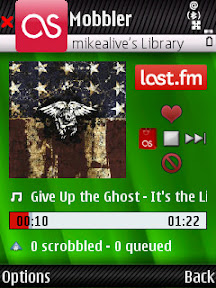
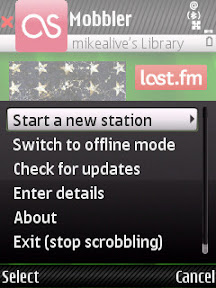
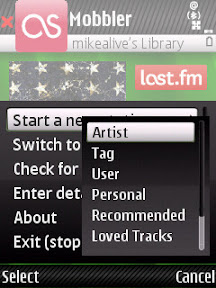
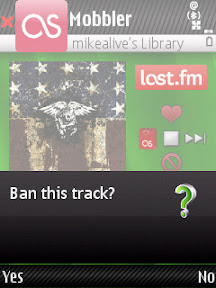
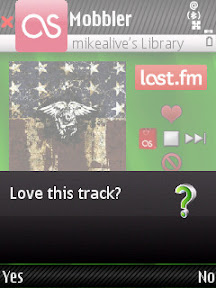
I took some screenshot of Mobbler on my N82 (I'm sure someone will ask me "what theme is that"). Check them out below:

When the song is playing....


Start a new station...


How to start the station...


Ban tracks that you don't like...


Specify the ones you love...


If you've never used Last.fm before than you'll have to go there and create an account to start listening. And like always, make sure you have a data plan with your carrier.

Click here to visit the Mobbler website, or click here to download the latest application directly.

Have any of you tried this out yet? What are your thoughts on the latest version of this great music application?

Continue Reading...

Thursday, October 23, 2008

N82 & Weather - Is A Storm Coming? I'll Just Check My Device!


For me, living in sunny Southern California a weather application on my N82 is not necessarily crucial because most of the time it's about 75 degrees and sunny at this time of the year. I think yesterday actually hit the upper 80's in the LA area. But I know some people don't have it so good, always having to battle snow, rain, and extreme temperatures. Nothing is worse than going outside unprepared for a huge storm coming your way.

This is where a good weather application is needed.

Weatherbug For S60

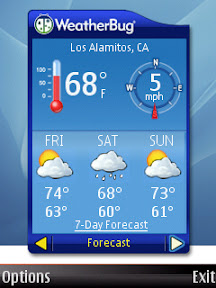
My personal favorite (and free) solution is the WeatherBug S60 Widget. It loads just as fast as any application on my N82 and gives the basic weather report and a simple 3 day forecast. Check out the screenshots...

Current Conditions & Forecast


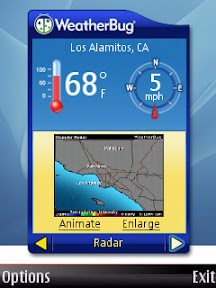
Current Radar Image


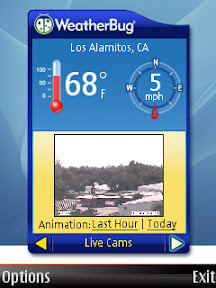
Current Weather Camera Image


Those are the only three aspects of this application. Again, it's just basic and to the point. You have links to the 7 day forecast and animated radar images that will take you to the weatherbug site in your web browser.


The WeatherBug widget for S60 is available in the Download! application of your N82.

But what if you want something better and more detailed?

Handy Weather For S60

I personally haven't tried this application, but I know it's extremely popular and loved. Check out some of the features:

Handy Weather will keep you connected with updated forecast anytime anywhere. All you need is wireless Internet compatibility to get weather news and forecast for 40 000+ preset cities worldwide and for any arbitrary location by coordinates. 10X faster than a browser! 10X easier! 10X less traffic!


Features:
  • Four handy and good-looking views: 5-day weather forecast, 5-day temperature graph, current conditions and detailed forecast for several locations you’ve selected.
  • 3 types of weather maps: the Temperature map presenting the weather chart of the selected zone shown by shades of blue, yellow and green, the Pressure map displays pressure space and depression areas. And also you will find a Satellite map of various parts of the world.
  • Complete wireless weather coverage available: high and low day temperature, weather type icon and text, wind direction, UV index, humidity and more…
  • Automatic update forecast (every 4, 8, 12 or 24 hours or at preset time)
  • Weather data is provided by the Intellicast, the world’s leading meteorological company


    Get your free trial from The N82 Blog Store right now and if you like it you can purchase a one year license. Click here for the link.

    How do you check the weather on your Nokia N82? Is this something that is important to you, or just a luxury and "nice to know". Do any of you have experience with either of these applications?

    Continue Reading...