Showing posts with label N82 Firmware Updates. Show all posts

Monday, January 26, 2009

Reports Coming In About New v31 Firmware Update For N82


I surprisingly woke up this morning to find that a few of my favorite RSS feeds are informing me about a new firmware update to our precious N82 - version 31.0.016. I first read the news by Ani from S60 Blog, which referred me to the original source over at All About Symbian. Steve Litchfield seems to be having a few problems with this new firmware, specifically with Nokia Maps. He says,

In my case, after upgrading, I hit lots of hangs (all involving Nokia Maps), requiring battery-out-restarts, so I used *#7370# to wipe the internal disk back to 'factory' status and am now rebuilding by syncing data and installing third party apps. At least this way, I end up with a fully optimised phone, but it's taking a while..... [Later] Maps is still misbehaving, hanging after launching and answering the 'Go online' question. I'm not pleased.

Yuck. That sounds horrible. One of his readers left the following comment, mentioning he isn't seeing these problems...
just upgraded successfully on a german n82 (GERMANY - 0554980). no problems so far, maps works as expected (i've manually installed an .sis update a while ago, if that matters).

I was going to try and update this morning but I decided to wait and try it after work, to see what others experience and check out the full changelog. No time to be the guineas pig today. Keep checking Steve's article throughout the day to see if there will be a changelog. If you happen to find one come over here and post it with a source.

If any of you decide to update let us know what happens, and if you see any significant changes. Be sure to back up all the data on your device before updating, for precautionary reasons.

Continue Reading...

Tuesday, January 13, 2009

Where Have My Assigned Ringtones Gone? They Seem To Be Missing


Ok I'm going crazy here. Every since the last firmware update, I've had a slight problem that I've been meaning to bring to the blog and ask all the readers because it has me truly baffled. One of three things is going on here:

1. I've lost it and the solution is right under my nose.
2. Something is wrong with my phone.
3. Nokia royally screwed something up in the latest firwmare update.

Of course I'm hoping it's the first, but I have a feeling it's the third.

In the previous N82 firmware version I was able to assign specific ringtones (songs/sound files) to specific contacts without a problem. Now when I go to do this, I still see the option but no sound files are showing. See my screenshot below...


See. No files are available to select, despite having 9 gigs worth of songs on my memory card. Not event the built-in ringtones show.

Am I the only one with this problem, or do all of you have similar results?

Continue Reading...

Tuesday, November 25, 2008

Thoughts About the N82's Loudspeaker Music Quality


Using wired headphones, music experience with an N82 is one of the best among the Nseries line. But the loudspeakers are disappointing, especially if you have never updated your firmware. So I decided to share the tips I use to somehow improve the music quality from the stereo speakers. Just to make it a little more acceptable than the way it is.


There's a Stereo Widening feature available on the music player, which really enhances the sound quality. Proven and tested through headphones. But I found out that it is the other way around when using the stereo speakers wherein turning it off makes the loudspeaker's sound output a tad better. Voices are more audible and clear, and one can easily distinguish the beat of the song even at lower volumes.

Here's how to turn it off:
  • Make sure you are on the Now Playing screen. (Options > Go to Now playing)
  • Hit Options > Audio Settings
  • Highlight and set Stereo Widening to off
Try and give it a shot. I'm not sure if everybody will find it any better but for me, it does. You will get the best result if you are using the latest firmware (V30). Now, I am more positive when someone asks me to play music and share them through the loudspeakers, at 100% volume.

You can also make use of walls and corners which I also find helpful to even improve the sound quality. Placing your N82 a few centimeters away and with the speakers facing a wall will make the volume a bit stronger and effectively spread out the sound. To read more about this, check out Devin's post from The Nokia Guide.

I am interested to know how many of you guys love (or hate?) listening music through your N82's loudspeaker. After getting 3 firmware updates already, I think its quality is not that bad anymore.

Continue Reading...

Thursday, November 6, 2008

Is It Just Me Or Did The N82 Battery Life Go From Just Tolerable To GOOD With The Latest Firmware?


Yesterday it dawned on me - I think I'm getting alot more battery life with the newest N82 firmware. Unless it's just my imagination. I understand that in some of the changelogs I've seen around the net battery life improvement is on the list, but that's a norm for all updates. I didn't think it would be this significant. Keep in mind I've only had the new firmware installed for about week and a half, and also had to do a hard reset. So in just the past few days I finally have my phone set up with all the applications I had before, and my N82 is now being used again to it's fullest.

I'm really hard on the battery, usually get through a word day with only a bar left and have to plug the N82 into my car charger after work on the way home unless I want to get the annoying "Battery Low" warnings all the way home. But yesterday was an exception.

Below is a rundown of what I put my battery through in about 10 hours...

  • Nokia Email Service application on all day. About 20 emails received, 8 sent.
  • Emoze Email appliction checking every 30 minutes. I use this application for my work email on my N82 which only allows me Outlook Web Access (OWA). Sent/Recieved around 6 emails.
  • Around 40 text messages sent/recieved.
  • 5 MMS messages recieved.
  • Send 5 photos to Ovi using Shozu.
  • Made about 25-30 minutes of phone calls.
  • About 10 minutes of Web Browsing
  • Google Maps on about 40 minutes out of the day checking traffic conditions to/from work with "My Location" enabled.
  • Sync with Ovi Calendar three or four times.
  • Listened to about 30 minutes of music.

Screenshot: Current open apps on the left side.

Thats about all I can remember. I consider that heavy use, especially since I had the data connection open all day checking for email. By the time I got home from work the N82 had been off the charger for about 11 hours, and still had 3 - thats right THREE bars left. I thought for sure it would drop down to one the second I got home from work, but no it didn't. I turned off my work email, kept on the personal email (Nokia Email Service), and it still had two bars when I finally plugged it back in at 11pm. Granted the remainder of my night was light use as I was just watching hockey and drinking a few beers.

Am I the only one that notices a significant improvement in the battery life since the N82 firmware has been updated to version 30? Or do you guys see similar results?

Maybe I'm crazy?

Continue Reading...

Friday, October 24, 2008

Thoughts On The Latest N82 Firmware - Overall I'm Happy With It


I finally updated my firmware on my N82 earlier this week to version 30.0.019. I've seen a whole bunch of comments on the last article I wrote about this update, but that was before I did it myself. Overall I'm satisfied with the N82's latest firmware update,I'm writing this article to give you my thoughts on it and I want to hear more of your comments.

So here is a basic rundown of what I've noticed and stands out to me...


- Auto-Rotation works better. It's less sensitive which is great, however, I think it takes to long to actually rotate. When I turn my phone to a distinct 90 degree angle I want it to switch fast - without delay. Regardless, I'm really digging this tweak. It was way too sensitive before.

- Music Player is LOUD! I really love this update. The music now sounds much louder and crisp, making the experience so much better. You can really notice when you hook up the phone to your car speakers or sound system. The power is there like never before.

- Slightly more RAM. I don't know the exact numbers, but it seems like I have a few more megabytes of available RAM with my common "auto-start" applications running like VibrateCall & Best Profiles. The phone also seems to run faster now.

- Increased Battery Life. I haven't really tested this extensively, but it seems like I'm getting much better battery consumption. Normally I'm down to a few bars at around 4pm of my workday after hours of music, lots of sms, email always on, and a good hour worth of data/browsing. I've noticed at this point of the day I know have about half a battery left after this recent update.

- Silent Profile # shortcut still works for me.

- Flash too bright? Out of about 50 photos taken since the update, I've noticed on about 6 or 7 occasions that the flash was too bright, making the image looked washed out with a white haze. This is in low-light conditions. I'm not sure if it's my phone or the update, but I never had this problem before. Anybody else getting this?

Like I said, this article is about what I've noticed and experienced. I still haven't seen an OFFICIAL changelog from Nokia so I can't say what else has been added/fixed, but that should be enough for anyone to want to upgrade.

I've read a few comments that the music player has been cosmetically updated, but I haven't noticed this. Am I missing something? It really looks the same to me.

A few things I wanted - but didn't get:

- Brighter screen
- Predictive text word options as featured on the Nokia E71 & E66.
- Search bar on homescreen one lines instead of two
- I wish the camera settings can be saved or "remembered"

Anything I'm here that should stand out to me? Are all of you happy with this latest firmware.

If your not experienced with updating your firmware - click here to read a few tips before starting.

Continue Reading...

Thursday, September 11, 2008

N82 Firmware v.30.0.019 Available? Reports Are Streaming In


P@sco from Jaspp.net is reporting that new Nokia N82 version 30.0.019 firmware is available on Nokia Software Updater. I haven't got a chance to check yet since I'm at work, but I hope to tonight (if my Windows partition is working).

Right now there is no official changelog, but I suspect it will be similar to the recent Nokia N95 8gb firmware update. What changes did that consist of? According to All About Symbian v.30 firmware of the N95 8gb changes include...

- Nokia Maps 2.0 now built-in
- Full N-Gage client now built-in
- Nokia Search 4.0 now with Google plug-in
- Share online 3.0
- Enablers for Comes With Music (watch this space)
- Download! application updated (v 3.1.50)
- Upgrade to Music Player, with new visualisations
- Update for Flash Lite 3 (improved viewing of sites like YouTube)
- Current consumption improvements (for e.g. WLAN scanning)
- New baseline for VoIP (with significant error corrections)
- Incoming call number is displayed in additon to name of the contact
- Realplayer supports FLV format (i.e FLV files can be played directly like MP4)

No word on the bug fixes.

Warning!!!
My pal Ricky from Symbian-Guru is trying to update his firmware and he says his phone is now bricked. He's just getting a white screen. Keep checking his site to see if he can fix the problem. He says the update is available for EURO 1 product code 0558752. Another update! Dr. Tran (Al) from The Nokia Blog has also informed me that his phone is bricked after trying to update. I would give it a week or so before trying this. Update again! Dr. Tran tried it again and now he got his phone back.

I recently posted an article for you guys if you remember asking what needs to be fixed in the new firmware. See the posts here and here.

If any of you can check it out and report back any changes that would be awesome. The main thing I'm hoping for is improved battery life. I'm really getting tired of conserving battery life at 5pm or my battery will die. I'm pretty sure this update isn't available for all product codes yet, I would give it 3-4 days before it's fully available.

Continue Reading...

Tuesday, July 29, 2008

Next N82 Firmware Update Part 2: What Features Are We Missing That We Need?


Last week we talked about what current features can be improved upon. Now I want to talk about features that we don't have that should be added. There are always big and small things that can be added that would make the phone extremely more useful.

For instance...

1) Add possible words to the T9 predictive text. While I'm typing out a word I should see a small list of the most common words I use that makeup the letters I'm using. Halfway through the word I can select the one I want instead of having to type out the entire word. This has been implemented on the Nokia E71 and E66, there's no reason why we shouldn't have it.

2) Add new emails to standby screen. I know we probably won't get this because it's an Eseries exclusive. Nokia does this to keep the Eseries more "business" centric. I really think they need to break away from this since the majority use their email for personal use rather than business. I have a feeling it's pointless for me to even ask for this.

3) Remote Phone Lock. If your phone is lost or stolen you can send a text to it with a code and it will lock down your phone and make it unusable. Another Eseries exclusive. Come on Nokia I don't want anyone to have access to my contacts, emails, etc. either.

4) Add support for full screen wallpapers. This is a no brainer. Why don't we have this feature yet Nokia? I don't mind if my active standyby icons are blocking anything, just leave it up to me. No reason we shouldn't have this already.

If you didn't notice all three of those ideas are Eseries features. I and my girlfriend have been playing around with an E71 for a few weeks and have grown to love the small features of the Symbian OS on that phone, although I missed out on lots of good photos that the E71 just couldn't do. Ravindra from Symbian Life Blog wrote up a great article a few weeks ago about what the Nseries can learn from the Eseries. It's really worth a look.

I know there are more new features that you all would like to see added. I'm pretty sure we won't get most of them but I'm curious to see what N82 users are actually missing out on that maybe other phones have.

Continue Reading...

Sunday, July 20, 2008

Next N82 Firmware Update Part 1 - What Current Features Should Be Improved Upon?


I'm feeling that it's almost time for a firmware update for the Nokia N82. Has anyone heard of a new firmware update for the N82 coming anytime soon? I personally haven't but I'm hoping the next one brings some good improvements.

I've been wanting to talk about three things that have to do with this topic:

What can be improved upon?
What can be added?
What bugs need to be fixed?

I don't want make this list as long as a bible because I want to hear what all of you want improved or fixed as well. This will be a 3 part segment, today we will be talking about what can be improved upon. In a few days I'll talk about new features that should be added.

Current Features That Need Improvement...

WLAN Connectivity - This is probably one of the biggest issues with S60 Feature Pack 1 phones such as the N95 and N82. Everytime my phone connects to the internet I would like it to first see if any WLAN access points I define are accessible in the order I choose. If there are no WLAN points ready than it can fall to my carrier's data connection. All this should be done in the background without me having to see it. The new Nokia N78 with Feature Pack 2 has something similar to this enabled and it works perfectly. There should be no reason Nokia can't add this feature.

Messaging - For many this list could be really long. First off I'd like to have the option to make the Conversation application I talked about last week the default messaging application. When I get a new text it should take me to the Conversation I might already be having with the person so I can see what was last said. Another user pointed out to me message details. We should at least be able to see the time a message was sent without having to dig around for it in the options. It should show right under the name of the person that wrote the message or below the actual message. I could go on and on about how bad the email system needs to be fixed but I'm saving that for another day.

Phonebook - I've been playing with the Nokia E71 for a few weeks courtesy of WOM World and I've fallen in love with many internal features that are different than Nseries devices. One is the phonebook. Say I open the phonebook and find the contact I'm looking for. I decide inside of hitting the green button and calling that person I want to just text him/her. Right now I'd have to push options then scroll down five clicks to "create message". What a hassle for such a simple task. On the E71 I can simply highlight the contact and push d-pad right. I then get a few options to call, text, email, or PTT. Simple and fast. No fumbling through the options menu. Keep in mind that the Nokia E71 also sports Feature Pack 1, but Nokia likes to change small features on Eseries and Nseries devices. They never give us the complete package. This small feature would be a great addition to the N82.

Audio Quality During Video Recording - I'm not sure that this is something that can be fixed with a firmware update, but I sure hope that Nokia is trying. The audio quality during normal video recording is not so bad, but when things get loud the audio just sounds terrible.

Smaller Top Headers In Basic Functions For More Real Estate - I'm talking about the top of the screen mainly in the Contacts and Messaging. There's no need for the huge picture of a phonebook and the large "Contacts" font. I already know I'm in contacts. I'd rather have it more subtle and small so I can see more people in the list without having to scroll. For instance, go to your Contacts and turn the phone landscape. You'll notice there is now no phonebook icon and the Contacts label is much smaller. This is exactly how I would like to see it in portrait mode. Like I said, this also goes for the messaging application when viewing lists of texts and emails.

Faster Gallery Load Time - Right now I only have about 100 photos on my memory card and only about 600mb worth of media. When I go to my Gallery on first startup it currently takes about 10 seconds to load. Can't we speed things up a little Nokia?

Camera Settings - Allow us to make our own Scene Modes and save them. Also an option to always use a default Mode we choose so we don't have to constantly change it to the one we're using that day. This would be great.

Bigger Caller ID Picture - Yeah I know I can use an application like FS Caller to do this but I think it should be built in. What's with the tiny thumbnail Nokia? If I'm not wearing my glasses you think I'll be able to read who's calling, let alone see the picture of them? Once again this is implemented in Feature Pack 2 phones like the N78 and upcoming N96, there's no reason Nokia shouldn't add this to the N82. It's a NO BRAINER.


I can go on and on but I'm going to leave some discussion up to you guys and gals.

I really want to know your thoughts and ideas and hopefully Nokia will pick up on some of our requests. I'm not saying all of these should be complete changes, but rather options. I'm sure many of you wouldn't welcome some of my proposals and like things just the way they are.

Stay tuned for the next part of this segment which we'll talk about completely new features that we should have but don't. This one should be interesting. Oh and thanks for hanging in there with the lack of articles during my vacation this past week. I had a great time and i was much needed time off for me and my girlfriend.

Continue Reading...

Friday, July 4, 2008

N82 FP2 Menu Transistions Coming? Video - The N81 Just Got The Update


Gosh dang Mr-X from FinestFones.com has really been on top of things lately. He found a video showing the Nokia N81 with menu transitions just like the Nokia N78 and upcoming Feature Pack 2 phones. There are so many questions to be asked here...

First off will the Nokia N82 receive a similar update to allow for FP2 transitions?

Does this mean that the N81 has Feature Pack 2, or is it still Feature Pack 1 but just with new transitions?

Can it be turned off the slick transitions if we get sick of them?

I'm sure many of you will have more questions. Check out the video of the N81 and transitions...


This is really interesting news and will be huge if the Nokia N82 gets this update. I don't see why it wouldn't since the N81 did. This is a much needed update since many complaints around the mobile industry about Nseries phones is the lack of glitz and glamor in the in the Symbian S60 UI. I'll keep posting updates as they come.

Continue Reading...

Tuesday, April 8, 2008

Have You Upgraded Your N82 Firmware Yet To v20.0.062? Tips For Upgrading...


Well its finally here. The new Nokia N82 firmware. I've been seeing reports all over the internet of people starting up their PC Suite and Nokia Software Updater and downloading the newest firmware, version 20.0.062.

Tips before you upgrade:

- Even with the User Data Preservation feature of the N82 that keeps all your applications, settings, calendar entries, email accounts, etc. - Still backup your phone before updating. Use the backup tool in pc suite and backup all your important stuff. You never know when something can go wrong.

- Make sure you have a secure and fast internet connection. Make sure your connections are plugged in good.

- Set your phone on a flat surface like a desk or table. Don't put the data cable where a dog or person will hit the cable and disturb the update process. You can brick your phone like this then your in a mess of trouble.

- When your update says that its finished the phone might look off like its dead. Leave it alone for 5-15 minutes sometimes it takes awhile to boot up. Eventually it should boot up on its own after the update.

- Make sure your battery is fully charged before the update.

- I personally try not have anything running in the background on the computer and disable the screensaver just to ensure nothing goes wrong.

If anyone else has any tips please share in the comments below. Let us know if you've successfully upgraded to the newest N82 firmware.

Also check out this article by Steve Litchfield from All About Symbian. He has a few screenshots of the new firmware, showcasing the new features including geotagging and flash 3 support.

Continue Reading...

Monday, April 7, 2008

Firmware Update For The N82 - Version 20.0.062 - Lots Of Big AND Small lmprovements


I just read some great news for Nokia N82 owners. The N82 is due for an upgrade and we've known for awhile now that it was coming. I've posted here at the blog about the Flash enabled Web Browser and built-in geotagging being added. This is indeed coming true!  We also complained about the problems with the phone freezing when plugging in the headphones. Looks like this is going to be fixed as well.

Nokia N82 fans can now watch Flash lite content such as Youtube, Google Video, Break.com (one of my favorites), flash videos on sports sites such as ESPN.com and Yahoo! This is simply awesome.

Teo from Symbian-Freak has got wind of of the full changelog and it looks we're gonna see many improvements to the phone. The new version is 20.0.062 and should be available on your Nokia Software Updater by the end of the week, but keep in mind sometimes it takes slightly longer for certain regions. You can also go to a Nokia Care Center and see if they'll update the firmware for you.

Here is the changelog that Symbian-Freak is claiming...

New features/functionalities:

  • Location tagging functionality added
  • Widgets enabled
  • Flash Lite 3.0 support
  • BT AVRCP protocol support

Stability:
  • When plugin/plug out USB or TV out cable phone crashes
  • Phone freezes during music play
  • Phone resets when pressing end key during alert

Messaging:
  • Cannot receive SMS for some operator who support 'Replace type' of message

Camera:
  • Camera overexposure improved
  • Automatic screen rotation angle improvement

Browser:
  • Stability improvements
  • Memory leak during phone call and browsing corrected

Memory:
  • Memory leak corrected in browser
  • Memory leak corrected in CPSSignal

Gallery:
  • Crash while file name included %marks is highlighted
  • DRM video thumbnail corrupted
  • Gallery crashes when video call is make from contacts
 

Click here to head over to the original Symbian-Freak article to see the full changelog  and have your say in their discussion.

I haven't seen anything as far as an update goes on my NSU. Let us know if you get yours updated and tell us about the new features.

Continue Reading...

Thursday, February 21, 2008

New N82 Firmware Update Coming Soon, Bringing Built In Geotagging Of Photos


Great news for all N82 owners. There is a firmware update coming soon, and it should be a good one. There's not much info right now about the update, other than the fact that we will be getting Photo Geotagging built into the N82. Thats right. When you take a picture, the location will be embedded into the file of the photo using GPS. This is useful for social photo sites such as Flickr, Ovi, and Picasa that allow you to add your photos to a map. Great for showing of vacation photos or hiking trips. Not to worry though, this feature can also be turned off if you have no use for geotagging. If you really want this feature now and your an advanced user, Nokia has made the Location Tagger application available at Nokia Beta Labs. Keep in mind it might be buggy. Click here to check it out with instructions and downloads. I personally haven't tried it out.

No word on when the next N82 firmware update will be available, Nokia says Quarter 1, which ends in March. Hopefully they will add the Web Browser flash support which we've recently seen enabled in the Nokia N95 8gb. As soon as the firmware becomes available I'll be sure to everyone updated.

Do you think you'd find Photo Geotagging handy?

Source: Official S60 Blog

Continue Reading...

Thursday, February 7, 2008

New Nokia N82 Firmware Update, User Data Preservation Now Works


I posted a few weeks ago about the news of "User Data Preservation" which means when you update your Nokia firmware, you won't lose your settings, applications, contacts and calendar entries. Pretty much nothing should be lost.

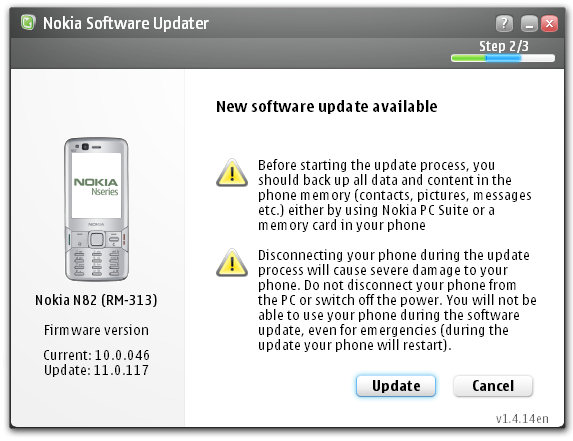
Well today the Nokia N82 recieved a small firmware update. The new firmware version is 11.0.117. User data preservation reportedly works well. This is huge news for Nokia enthusiasts and just goes to show that Nokia is listening to their customers.

An official changelog has not been released, but I'm reading that it's mostly crucial bug fixes. This update is currently available for European product codes.

Source: All About Symbian

Continue Reading...