

Ok I'll be honest. I've heard plenty about Last.fm but I never gave it a try. I always use Pandora.com for all my internet radio streaming needs when I'm at my computer. I've always wanted a solution to Pandora on my N82 but have never got it. Today I saw this post over at Symbian In Motion and decided to give both Last.fm and this new S60 Last.fm scrobbler application called Mobbler a try. Wow am I impressed.
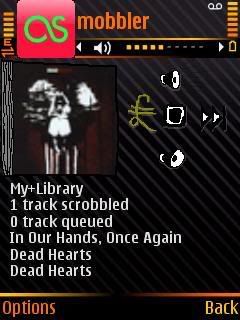

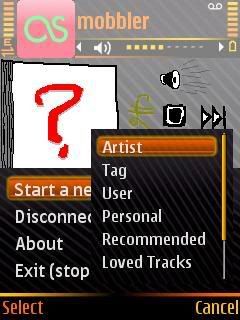
I've been using Last.fm all day now informing it of all the music I like and it has already came up with tons of more bands/artists that suit my tastes. When I launch Mobbler from my N82 and sign into my Last.fm account I get only streaming music that is related to my tastes. Or say I go out on a limb and feel like hearing some hip-hop (which I don't listen to often) it will find random hip hop artists that relate to the artist I typed in.
In order to use Mobbler you must have a Last.fm account. When you launch the application you will need to first login. Then hit Options > Start A New Station and you can go by artist, tag (genre), user, personal, recommended, & loved tracks. If you first learn Last.fm on the computer you will better understand how it works.
Also, if you leave Mobbler running in the background and you play tracks already on your phone from your music player the application will learn the music you like and apply it to your account for future internet radio streaming on your Last.fm account.
Here is how the developer describes Mobbler...
Mobbler, Mobile Scrobbler, is a last.fm radio player and scrobbler for Nokia S60 3rd edition smartphones. It allows you to listen to your last.fm radio stations and to scrobble tracks played using the Nokia S60 Music Player. Music player scrobbling can be done both whilst you listen, or queued offline to be submitted later.
And how it works from their Wiki page...
A track will be scrobbled if you listen to more than either 50% or 4 minutes of it in one go, whichever comes first. The track must also be over 30 seconds long.
If you restart your phone you will also have to restart mobbler to continue scrobbling. It would be nice if mobbler was a startup application, but it is not possible at this time.
A track will be sent to last.fm as 'now playing' only once per listen. If you pause and restart a track it will not resend to last.fm.
If your mobile phone loses it's data connection, mobbler will queue the tracks you listen to. When the data connection becomes active again, mobbler will automatically reconnect and scrobble all the queued tracks in one go.
If you close mobbler without scrobbling the tracks you listened to in that session it will still remember them and scrobble them the next time you open mobbler and connect to last.fm.
The status bar at the top of mobbler will tell you what state mobbler is in. If you are connected and everything is ok, it will tell you how many tracks it has successfully scrobbled so far. If you are not connected, it will tell you how many tracks have been queued and are awaiting submission the next time you connect. If there is a problem with mobbler, it will also tell you there.
If you scrobble tracks using another client before scrobbling tracks queued in mobbler, last.fm may ignore the tracks from mobbler due their spam protection filter. It would be best to scrobble any queued tracks from mobbler before using any other last.fm client.
Right now I can't get it to stream good over an Edge connection. I'm sure with 3g or Wifi it works a lot better. Maybe it's the building I'm in. The application is still farely new and in beta stage so you might find some kinks.
Keep in mind this application uses all data for streaming. It needs a constant data connection, so if you don't have an unlimited data plan be extremely careful.
Click here to download Mobbler and start streaming Last.fm to your Nokia N82 today.
Let me know what you guys think. Do you like it better than Nokia Internet Radio?


6 comments:
Hmmm,Again the data plans matter,I hate it.When will be able to get hold of this.
There are problems with this application running on the N82. If you use the long press menu button to bring up the task list it won't show. It works fine with jBak task list, which you said you use, but if you hit the green button while in jBak to bring up the system task menu then it'll crash. Only way back to normal is to hit red button to close the system task list.
I also have a problem with v2 whereby if I reboot the phone, not done very often, the application won't start again.
Apart from all that it's a good little app.
@ Rav, I feel for ya buddy.
@ James, yes there are a few kinks. I hadn't noticed that first bug you said, thanks for the heads up. Yeah the app doesn't restart itself. The developer mentioned that on his page, hopefully they come up with that in the next version. To solve this use Jbak Taskman. Highlight the application and select menu, program rules, autostart. And there you go. I love Jbak Taskman.
@Mike: What I meant when I said the application won't start after a reboot. Is that it won't run at all for me. I know about and use the start on boot option from jbak. However to get mobbler to run again after reboot I have to uninstall then reinstall. I've been looking for a good last.fm tool for a long time and this one is the best around, just a shame I won't work for me.
I maybe could do with doing a hard reset on the phone. Would that uninstall my hacks to allow unsigned applications or is c:\ left alone?
@ James. Thats odd I don't have that problem. If you do a hard reset you will lose your hack and all applications on your phone.
perfekt software! made some new screenthots (for the new version) and put it in my blog:
http://www.tatoosh.de/?p=325
Post a Comment
Please leave your screen name so I can refer to you if there are numerous comments. Thanks!